Why React Still Doesn't Have Its WordPress — And Why We Built ReactPress 4.0

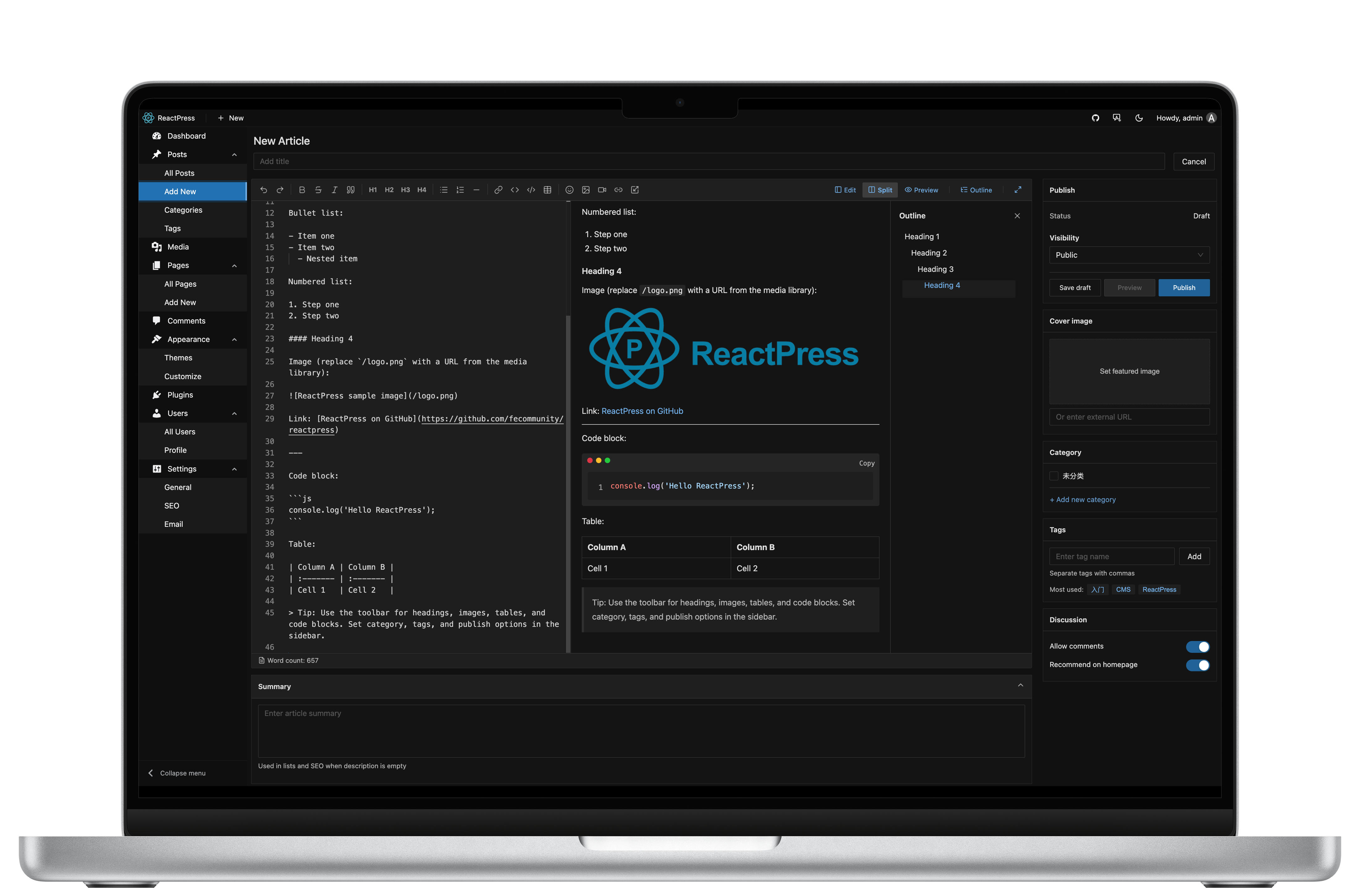
If you are a front-end engineer, you have probably lived this loop:
- The team decides the marketing site or blog should run on React / Next.js.
- You evaluate Strapi, Payload, Contentful, Sanity, Ghost, Tina — each is good at something, yet none ships a complete publishing platform you can install, write in, and publish from on day one.
- You fork a Next.js blog starter, wire up a Headless backend, then build media handling, comment moderation, SEO metadata, preview mode, and deployment scripts yourself.
- Three months later the blog is still not live — but you are maintaining five repositories.
Meanwhile, WordPress still powers more than 40% of the web. PHP is mocked as legacy. Gutenberg is criticized. And yet WordPress remains the default choice for solo bloggers, content teams, agencies, and SMBs worldwide.
React has ruled the front end for ten years. Why does it still not have its own WordPress?
That is not a skills problem. It is a product category problem. For three years our community kept asking the same question: "Can we manage content like WordPress, but deliver it with Next.js?" Existing answers either ship only an API, weld Admin and theme into one unmaintainable app, or require Docker + MySQL + six npm packages before you can write a single paragraph.
We built ReactPress 4.0 to close that gap — an open-source React publishing platform, not another Headless backend you must assemble yourself.
This article is a long-form field guide. It explains:
- What the industry is missing, and why the "impossible triangle" of editing, frontend freedom, and out-of-the-box completeness keeps breaking teams.
- Why WordPress won for twenty years — and which lessons transfer to React, and which do not.
- Why the React ecosystem has excellent parts but no default whole machine.
- How ReactPress 4.0 works: one CLI, one Admin, swappable Next.js themes, Hook-based plugins, an Electron desktop client, and a Headless REST API that is on by default.
SEO focus: React CMS · Next.js CMS · WordPress alternative · React publishing platform · Open source CMS
Table of contents
- Executive summary
- The industry problem
- Why WordPress succeeded
- The React ecosystem gap
- ReactPress philosophy
- System architecture
- See it in action
- Admin: the writing surface
- Theme system
- Plugin system
- Desktop client
- Headless API
- SEO and performance
- Security model
- Deployment patterns
- Migration paths
- Who should use ReactPress
- Roadmap
- FAQ
- Getting started
- Conclusion
- Appendices A–AF — comparisons, module deep dives, runbooks, extended FAQ
About this guide: ~100,000 characters · ~12,500 English words · default language English · last updated 2026-07-12 · 中文版
Executive summary
| Question | Short answer |
|---|---|
| What is ReactPress? | A self-hosted React publishing platform: NestJS API + Vite Admin + Next.js theme + Hook plugins + CLI + Electron desktop. |
| Is it a Headless CMS? | It includes Headless REST, but delivers far more — visitor site, Admin, and extensions out of the box. |
| WordPress alternative? | Yes, for teams that want WordPress-style workflows with a modern React / Next.js stack. |
| How fast to start? | npm i -g @fecommunity/reactpress → reactpress init → live stack in ~60 seconds. |
| License | MIT — fork, self-host, commercial use allowed. |
| Current release | 4.0 (codename Extend) — plugins, desktop, npm theme catalog. |
npm i -g @fecommunity/reactpress
mkdir my-site && cd my-site
reactpress init
| Surface | URL |
|---|---|
| Public site | http://localhost:3001 |
| Admin | http://localhost:3001/admin/ |
| API | http://localhost:3002/api/health |
1. The industry problem
Modern content infrastructure forces a bad trade-off. Teams must pick two of three: great editing, frontend freedom, and a complete system you can run tomorrow.
1.1 The impossible triangle
Over the last decade, content tooling split into three paths. Each solves real problems — and each leaves a hole.
Path A: WordPress-style monolithic CMS
WordPress binds content management, theme rendering, and plugin extension inside one PHP runtime. For non-technical users it is extraordinary: install a theme, add plugins, launch ecommerce, memberships, forms, and SEO without writing code.
The costs are equally well known:
- Theme and plugin quality varies wildly — one bad plugin can tank performance or security.
- The front end is locked to the PHP theme system — React teams cannot reuse component libraries or design systems without a Headless detour.
- Headless mode is bolted on, not the default mental model; REST works, but often needs extra plugins and glue.
- Core Web Vitals frequently depend on caching layers (Redis, CDN, page-cache plugins) instead of SSR/ISR as a first-class design choice.
WordPress optimizes for "let people who cannot code publish" — not "let people who code in React publish with the same ease."
Path B: Static site generators
Hugo, Jekyll, early Gatsby, Astro — they maximize build-time HTML and deliver excellent Lighthouse scores at low hosting cost.
SSG hides a strict assumption: content change = developer edits Markdown + CI rebuild. Non-technical editors cannot ship articles independently. Drafts, scheduled posts, media libraries, comment moderation, and multi-author permissions — routine in WordPress — are absent or Git-shaped in pure SSG flows.
Next.js App Router and ISR help, but three questions remain unanswered in most setups:
- Where do posts live?
- Who can write in a browser without touching the repo?
- Where do uploaded images go?
Path C: Headless CMS
Strapi, Payload, Directus, Sanity, Contentful — they excel at content APIs: customizable schemas, multi-channel delivery, permissions.
What they typically do not ship is the visitor-facing website and the daily writing UI your authors expect as a finished product.
A typical Headless rollout:
Pick Headless CMS → define schema → tolerate or customize Admin
→ build Next.js front end → wire API → implement SEO / sitemap / OG
→ configure media storage → build or buy comments → write deploy scripts
→ train editors on a new back office
That is viable for mature platform teams. It is heavy for "we need a React-stack blog this week."
1.2 The contradiction, summarized
| Path | Editing | Frontend freedom | Out of the box | Modern performance |
|---|---|---|---|---|
| WordPress | ✅ | ❌ | ✅ | △ |
| SSG / bare Next.js | ❌ | ✅ | △ | ✅ |
| Headless CMS | △ | ✅ | ❌ | Depends on front end |
| Target: React publishing platform | ✅ | ✅ | ✅ | ✅ |
React won on frontend freedom and performance. It never shipped the complete publishing platform category WordPress owns.
That is why ReactPress exists.
1.3 A front-end lead's real week
Consider a story we hear almost weekly:
Monday: Product wants a blog with SEO; marketing must publish without developers. You open the tech spec and list Strapi, Payload, Ghost, and Headless WordPress.
Tuesday: You pick Strapi. Docker, PostgreSQL, Content Types. The Admin works, but marketing complains that uploading an image requires four fields when they only want Markdown articles.
Wednesday: You start the Next.js front end — routing, layout, dark mode, syntax highlighting. Work that belongs in a theme is being rebuilt inside a product app.
Thursday: SEO — sitemap, Open Graph, JSON-LD, canonical URLs — three more PRs. Comments? Disqus or build your own; Strapi does not care.
Friday: Deploy API on a VPS, front end on Vercel, media on OSS, four CI pipelines. Marketing asks: "Where do I preview drafts?" You pause: "We still need preview mode…"
Next Monday: Product asks for status. You say "the backend is done." They ask: "When can we publish?"
The failure is not any single tool. Nobody delivered the full loop of publishing — install, write, preview, ship, extend.
ReactPress ends that loop. Not with a better API alone, but with a machine that is already assembled.
1.4 Why "one more Headless CMS" is not enough
Every new TypeScript Headless CMS launch gets praise for schema design. We celebrate those projects — they push content modeling forward.
For "ship our team blog this week," however, a prettier Content Type editor does not reduce the number of Next.js pages you must write.
The industry does not lack Headless CMS options. It lacks:
- A production-grade visitor site by default — not a demo repo.
- A writing Admin authors open daily — not Swagger's neighbor.
- Extension points — install plugins, not fork core.
- Operations entry points —
doctor, not a forty-page deploy guide.
When all four are true, the category name should be Publishing Platform, not Headless CMS. ReactPress chooses the former.
1.5 Total cost of ownership: assembly vs platform
Hidden costs dominate Headless assembly projects:
| Cost center | Headless assembly (typical) | ReactPress (default) |
|---|---|---|
| Initial engineering | 2–8 weeks | ~60 seconds to running stack |
| Ongoing repos | 3–5 (API, web, infra, theme, scripts) | 1 site directory + optional theme fork |
| Editor onboarding | Custom docs for bespoke Admin | WordPress-familiar /admin/ |
| SEO baseline | Build sitemap, OG, JSON-LD yourself | Theme starter + SEO plugin |
| Offline writing | Not standard | Electron desktop + SQLite |
| Diagnostics | Log diving across services | reactpress doctor |
Platforms win when time-to-first-article matters more than infinite schema flexibility on day one.
2. Why WordPress succeeded
Before asking for "React's WordPress," understand what WordPress actually won — beyond PHP and early hosting deals.
2.1 One front door, zero decision fatigue
WordPress users rarely choose among backend frameworks, front-end stacks, and deployment patterns. Download, database credentials, /wp-admin/ — one path.
That "zero decisions" feels limiting to engineers. For most site owners, fewer choices is the product.
ReactPress 4.0 adopts the lesson: npm i -g @fecommunity/reactpress → reactpress init → API + Admin + theme in ~60 seconds. No Docker by default. No hand-written .env. No three terminal tabs.
2.2 Core / Theme / Plugin boundaries
Early WordPress established a durable split:
| Layer | Responsibility |
|---|---|
| Core | Data model, admin framework, user roles |
| Theme | What visitors see |
| Plugin | Cross-cutting logic — SEO, forms, security, ecommerce |
That separation enabled "change skin without changing bones" and "add capability without forking theme." A theme market and a plugin market followed.
React projects often lack an official, community-recognized boundary. Next.js apps merge CMS concerns, marketing UI, and product code. Changing "theme" means rewriting the repo.
ReactPress maps the model explicitly:
| WordPress | ReactPress | Role |
|---|---|---|
| wp-admin | Admin (/admin/) | Content, media, settings |
| Theme | themes/* (Next.js) | Visitor SSR/ISR site |
| Plugin | plugins/* (Hooks) | Server-side extension |
| REST API | /api/* | Headless access, on by default |
| — | Desktop (Electron) | Local-first writing |
2.3 Plugins as longevity
WordPress hosts 60,000+ plugins. Search, install, activate — that loop built a civilization of extensions without waiting for core releases.
React "plugins" are usually private npm packages or forks — high skill floor, not hot-swappable, no marketplace gravity.
ReactPress 4.0 ships Hook + plugin.json, Admin slots, and built-in SEO / summary / image-optimizer plugins so "extend without touching core" is platform-native.
2.4 Hosting democratization
WordPress succeeded with one-click installers on shared hosts. Users should not need to understand Nginx or PM2 on day one.
ReactPress defaults to embedded SQLite, documents VPS/Docker paths for growth, and ships reactpress doctor — lowering "will it run on my machine?"
2.5 What we learn — and what we refuse to copy
We learn: single entry point, theme/plugin boundaries, author-first workflows, data portability.
We refuse: welding visitor rendering and Admin into one PHP theme; plugin quantity over architectural debt; requiring Docker/MySQL for a first article.
Same editing workflow. Modern Next.js delivery. That is the accurate relationship to WordPress — and what WordPress alternative should mean in 2026: not PHP cosplay, but rebuilding the publishing platform category on React.
2.6 Gutenberg: writing UI as product, not afterthought
WordPress 5.0's block editor was controversial, but one decision was right: treat the writing surface as core product, not a database form with labels.
ReactPress Admin uses Markdown — our primary audience is technical teams and developer blogs — yet the principle holds: drag-and-drop media, categories, tags, schedules, comment moderation, and plugin settings live in Admin.
We deliberately avoid stuffing React presentation components into Admin as "blocks." That would leak theme logic into core. Presentation components belong in themes.
2.7 Data ownership and open source
WordPress's GPL heritage and MySQL-on-disk model made migration and self-hosting credible.
ReactPress is MIT. SQLite lives at .reactpress/reactpress.db. Backup can be tar czf backup.tar.gz .reactpress uploads. For teams searching open source CMS, that means auditable source, no mandatory cloud, and fork-friendly customization.
When content is an asset, the platform must be portable too.
2.8 The WordPress economy — lessons for ReactPress
WordPress created parallel economies:
- Hosting (managed WordPress)
- Themes (marketplace + custom agencies)
- Plugins (free + premium)
- Agencies (implementation + care plans)
ReactPress 4.0's roadmap — npm theme catalog, plugin catalog, marketplace — targets the same extension economies, but with npm + TypeScript + Next.js as the distribution layer instead of zip uploads to wp-content/.
The goal is not to clone ThemeForest on day one. The goal is to make theme and plugin authors have a standard addressable runtime so ecosystem gravity can accumulate.
3. The React ecosystem gap
"React CMS" is not an empty keyword. Many projects exist. Few occupy the Publishing Platform quadrant — editor-friendly and developer-friendly and complete out of the box.
3.1 Positioning map
                    Editor-friendly
                          ↑
            WordPress     |     ReactPress (target)
                          |
      Headless ───────────┼─────────── Full-stack frameworks
      (Strapi, etc.)      |
                          |
            Markdown+Git  |     Next.js blog templates
                          ↓
                    Developer-friendly
- Next.js blog templates: beautiful front ends, no CMS.
- Headless CMS: strong APIs; you build Admin UX and visitor site.
- Notion / docs → static: great drafting, weak custom domain + SEO control.
- Git-based CMS (Tina, Decap): developer-native; higher friction for non-technical editors.
- SaaS publishing (Ghost, Medium): complete loops, varying self-host and theme freedom.
The gap is upper-right: both editors and engineers happy, unified on React / Next.js.
3.2 Why Next.js did not ship a CMS
Next.js is a rendering and routing framework, not a content platform. Contentlayer, MDX, Draft Mode — excellent for developer-driven sites, not daily editorial operations.
Expecting Next.js to bundle WordPress-style Admin is like expecting React to bundle a database. Framework teams correctly stay in lane.
So Next.js CMS became an integration problem: every team wires Headless + custom Admin + SEO + deploy. The community has brilliant parts, not a standard whole.
3.3 Search intent behind the keywords
| Keyword | Surface need | Deep need |
|---|---|---|
| React CMS | React admin | No PHP; unified stack |
| Next.js CMS | Next integration | SSR SEO + customizable front end |
| WordPress alternative | Leave WordPress | Keep workflow, lose PHP baggage |
| Open source CMS | Self-host | Data sovereignty, auditability |
| React publishing platform | End-to-end | One command, not five repos |
ReactPress answers the last row: Publish with React. Ship like WordPress.
3.4 Our own iteration history
ReactPress evolved inside the FECommunity ecosystem:
| Era | Codename | Lesson |
|---|---|---|
| 2.x | — | Proved demand; packages too fragmented |
| 3.0 | Platform | One CLI, ~60s stack; Docker MySQL default felt heavy |
| 3.1+ | Toolkit | Unified API contract; Next 14 / React 18 |
| 4.0 | Extend | Plugins, desktop, npm themes; SQLite default; bundled CLI runtime |
Each release responded to Issues — not roadmap bingo. 4.0's bundled runtime, SQLite, npm themes, Hook plugins, and Electron desktop each map to repeated user stories.
3.5 Landscape comparison (default deliverables)
| Solution | Ships by default | Visitor site | Typical friction |
|---|---|---|---|
| Strapi | API + Admin | No | Build Next.js front end |
| Payload | API + Admin (React) | No | Same |
| Sanity | API + Studio | No | SaaS pricing, vendor path |
| Contentful | API + web app | No | Enterprise Headless |
| Ghost | API + Admin + theme | Handlebars theme | Not React stack |
| TinaCMS | Git / API hybrid | Varies | Git conflicts, dev-centric |
| Next.js blog example | Sample code | Yes | No CMS; Markdown in repo |
| Headless WordPress | REST API | You build | Plugin/config sprawl |
| ReactPress | API + Admin + theme + plugins + CLI + desktop | Next.js SSR | Young plugin market |
Google "Next.js CMS" and you mostly find tutorials on connecting Next.js to Headless — not installing a full CMS in one command. That tutorial-shaped gap is the product gap.
3.6 Signals from the community
Recurring sentences in discussions and Issues:
- "We already use Next.js — we don't want PHP WordPress for the blog."
- "Strapi works but I lost two weekends on the front end."
- "Is there a self-hosted open source option that isn't another assembly kit?"
These are engineering pain, not marketing copy. ReactPress 4.0 is built as a response.
3.7 The missing "default stack" moment
React has a default bundler story (Vite / webpack era), a default framework story (Next.js for full stack), a default UI story (component libraries) — but no default publish story.
When a junior developer asks "how do I launch my blog?" the answers fork:
- WordPress (PHP)
- Medium / Substack (platform lock-in)
- "Fork this Next.js template and use Notion as CMS"
- "Spin up Strapi"
There is no answer equivalent to create-react-app or next new for publishing. ReactPress aims to be that answer: reactpress init.
3.8 Framework churn vs platform stability
React teams rewrite front ends every few years — Pages Router to App Router, CSS-in-JS to Tailwind, REST to tRPC. Content outlives framework fashion.
A publishing platform must separate durable content (articles, media, URLs) from replaceable presentation (themes). WordPress survived because themes churn while posts remain. ReactPress copies that separation with Next.js themes + stable REST — not by freezing your entire app in one Next repo.
4. ReactPress philosophy
ReactPress is not only a Headless CMS. It is an open-source publishing platform for the React era.
4.1 One-sentence definition
Admin owns content · Theme owns presentation · Plugin owns logic
· API owns data · Toolkit owns the contract
- Content belongs to the system — posts, pages, media, taxonomy, comments, settings.
- Presentation belongs to themes — swappable Next.js apps.
- Logic belongs to plugins — SEO, summaries, image pipelines via Hooks.
- Data exposes through API — REST, Swagger, API keys.
- Toolkit unifies clients — one typed HTTP layer for Admin, theme, plugin UI.
4.2 vs Headless CMS
| Dimension | Headless CMS | ReactPress |
|---|---|---|
| Deliverable | API (+ Admin) | API + Admin + theme + plugins + CLI + desktop |
| Visitor site | Your problem | Official Next.js theme; swappable |
| Onboarding | Deploy backend → build front end | reactpress init ~60s |
| Extension | Webhooks, custom fields | Hooks + plugin.json + Admin slots |
| Stack | Mixed | React + Next.js + NestJS |
Need only an API and custom everything? Headless may be lighter.
Need WordPress workflow + React front end + one CLI? ReactPress fits — the practical WordPress alternative for JS teams.
4.3 Design principles
From ARCHITECTURE.md:
Maintainability → Extensibility → Tech fit → Low cost
Hard rules:
- Admin does not serve visitor pages. Themes do not serve
/admin/. - All front ends talk to the API only through Toolkit.
- Server depends on no front-end package.
- Themes never touch the database.
4.4 Two audiences, two paths
| Audience | Goal | Entry |
|---|---|---|
| Site owners | Launch blog, team publishing | npm i -g @fecommunity/reactpress → init |
| Contributors | Core, themes, plugins | Clone monorepo → pnpm dev |
4.5 Thirty-second start
npm i -g @fecommunity/reactpress
mkdir my-site && cd my-site
reactpress init
| Service | URL |
|---|---|
| Public site | http://localhost:3001 |
| Admin | http://localhost:3001/admin/ (admin / admin) |
| API | http://localhost:3002/api/health |
SQLite by default. No Docker. reactpress doctor when something fails.
4.6 "Content in the system, front end for developers" in practice
Anti-pattern A: Embed full theme preview in Admin with global theme CSS — couples Admin to theme; theme swap breaks back office.
Anti-pattern B: Theme reads DB connection strings — kills Headless path and security boundaries.
ReactPress approach: Preview on :3003; themes use NEXT_PUBLIC_API_URL; mutations go through authenticated REST.
Editors and theme developers work in parallel pipelines — essential for multi-disciplinary teams.
4.7 vs visual site builders
Webflow, Framer, Wix solve publishing through visual editors + hosted lock-in. Great for landing pages; narrow for teams that need Git-reviewed theme code, CI deploy, API integrations.
ReactPress is not a drag-and-drop page builder. It serves teams who treat code as asset — themes in Git, plugins in monorepo, content in CMS.
4.8 What "platform" means operationally
A platform provides:
- Stable contracts (REST + Toolkit types)
- Lifecycle tools (
init,doctor,logs,stop) - Extension registries (themes, plugins)
- Opinionated defaults (SQLite, official theme, SEO plugin)
- Escape hatches (Headless-only, custom theme, MySQL)
A CMS backend alone provides APIs. ReactPress provides the full operational loop.
5. System architecture
ReactPress 4.0 uses a monorepo + multi-process model: content management, visitor delivery, and API services are decoupled; Toolkit unifies contracts.
5.1 Architecture diagram
5.2 Authoring-to-delivery flow
Step-by-step:
- Author creates content in Admin or Desktop.
- Request flows through Toolkit to NestJS API.
- Plugins run on Hooks — summaries, SEO validation, image jobs.
- Data persists to SQLite (default) or MySQL.
- Theme fetches published content and SSR/ISR renders for visitors and crawlers.
5.3 Package responsibility matrix
| Package | npm | Role | Rendering | SEO |
|---|---|---|---|---|
| server | Bundled in CLI | Business logic, persistence, auth, Hooks | — | — |
| web | Bundled in CLI | Admin UI | Vite CSR | No |
| themes/ | Per theme | Visitor site | Next SSR/ISR | Yes |
| toolkit | @fecommunity/reactpress-toolkit | API client, types | — | — |
| plugins/ | Per plugin | Hook logic + Admin slots | Mixed | Plugin-driven |
| desktop | GitHub Releases | Electron + local API | Loads web/dist | No |
| cli | @fecommunity/reactpress | init, doctor, orchestration | — | — |
5.4 Technology choices
| Decision | Choice | Rationale |
|---|---|---|
| API | NestJS | Modular TS, Hook-friendly |
| Admin | Vite + React SPA | Interactive; no SSR needed |
| Visitor site | Next.js App Router | SSR/ISR, SEO primitives |
| Extension | Hooks + manifest | WordPress mental model |
| Default DB | SQLite | Zero config |
| Desktop | Electron | Reuse Admin SPA |
5.5 Runtime ports
| Process | Default port | Notes |
|---|---|---|
| Theme (public) | 3001 | Includes /admin/ proxy |
| API | 3002 | REST + Swagger |
| Theme preview | 3003 | Admin iframe preview |
| Admin (monorepo dev) | 3000 | Standalone Vite dev server |
5.6 Directory layout after init
my-site/
├── .reactpress/
│   ├── config.json          # ports, database, URLs
│   ├── runtime/{theme-id}/  # installed theme copy
│   ├── plugins/{plugin-id}/ # installed plugins
│   └── reactpress.db        # SQLite (default)
├── .env                       # CLI-generated
└── uploads/                   # media
Think of .reactpress/ as WordPress wp-content/ + database — backup with:
tar czf backup.tar.gz .reactpress uploads
5.7 Toolkit: single API client discipline
Early 3.x allowed ad-hoc fetch per package → field drift between Admin and theme. 4.0 enforces Toolkit only:
- OpenAPI-aligned types and paths
- Unified errors and auth headers
createThemeApi,PluginContext, Admin React hooks
You lose "raw axios everywhere" freedom; you gain fewer production surprises on upgrade.
5.8 Headless without leaving the platform
curl -H "X-API-Key: YOUR_KEY" \
  "http://localhost:3002/api/article/headless/list?status=publish&page=1&pageSize=10"
Use API-only for mobile apps, secondary sites, or microservices — same content, many surfaces. That is how a React CMS should flex.
5.9 Monorepo map for contributors
| Directory | Purpose |
|---|---|
cli/ | Global CLI, process orchestration, bundled runtime |
server/ | NestJS modules, entities, Hook service |
web/ | Admin SPA |
themes/ | Theme registry + hello-world + catalog anchors |
plugins/ | Plugin registry + built-ins |
toolkit/ | Shared types and HTTP clients |
desktop/ | Electron main/preload, local API bootstrap |
End users never clone this. They install @fecommunity/reactpress and run init.
5.10 Failure modes and boundaries
| Failure | Guardrail |
|---|---|
| Theme bypasses API | Architecture review; no DB drivers in theme |
| Plugin injects Next routes | Forbidden — plugins are server-side |
| Admin embeds business rules | Belongs in plugins via Hooks |
| Multiple API clients | Toolkit enforcement |
These boundaries feel strict until you maintain the project for three years — then they feel like oxygen.
6. See it in action
Platforms are judged by whether they run, not only whether they diagram well.
6.1 CLI: install to live site in ~60 seconds
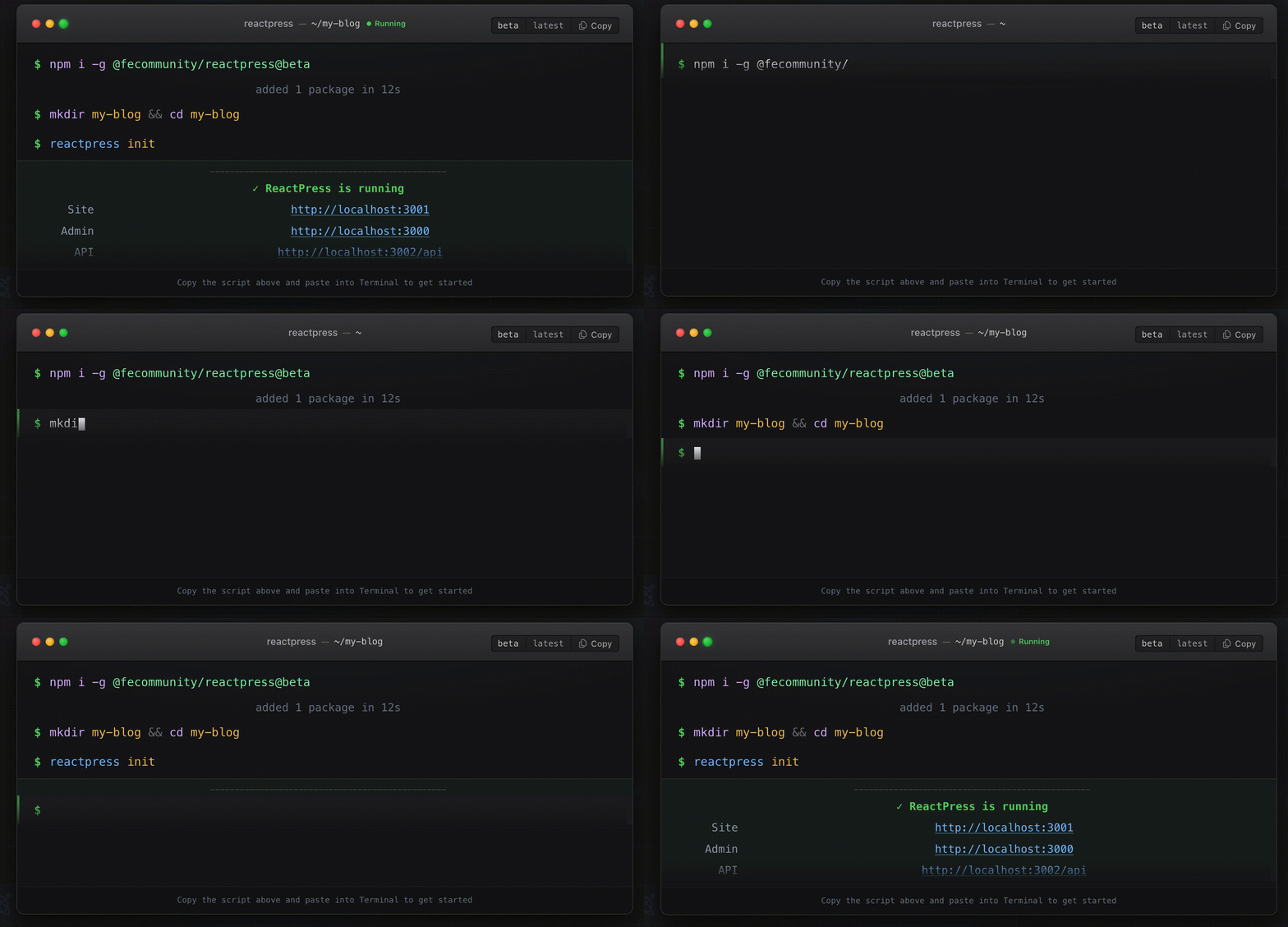
One global install. One init. Browser opens to visitor site and Admin. No Docker pull. No six terminals. No handwritten env files.
This is the WordPress "single front door" lesson — delivered as React + Next.js + NestJS.
6.2 Visitor site: search, comments, knowledge base, dark mode
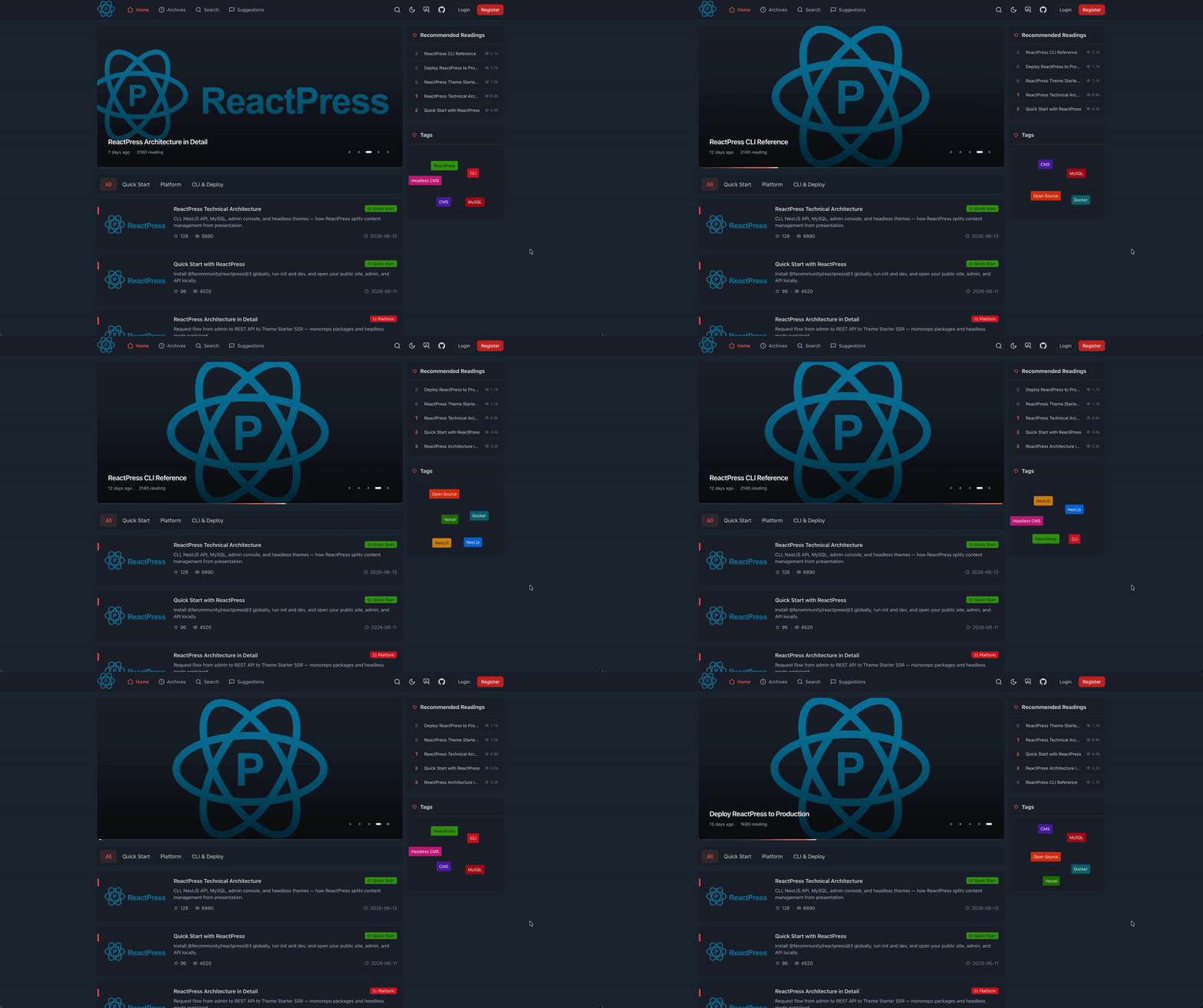
The official reactpress-theme-starter demo includes:
- Full-text search
- Comment system
- Knowledge base / docs navigation
- Dark mode
- Responsive layout
sitemap.xml,robots.txt, JSON-LD
6.3 Lighthouse: performance and SEO as defaults
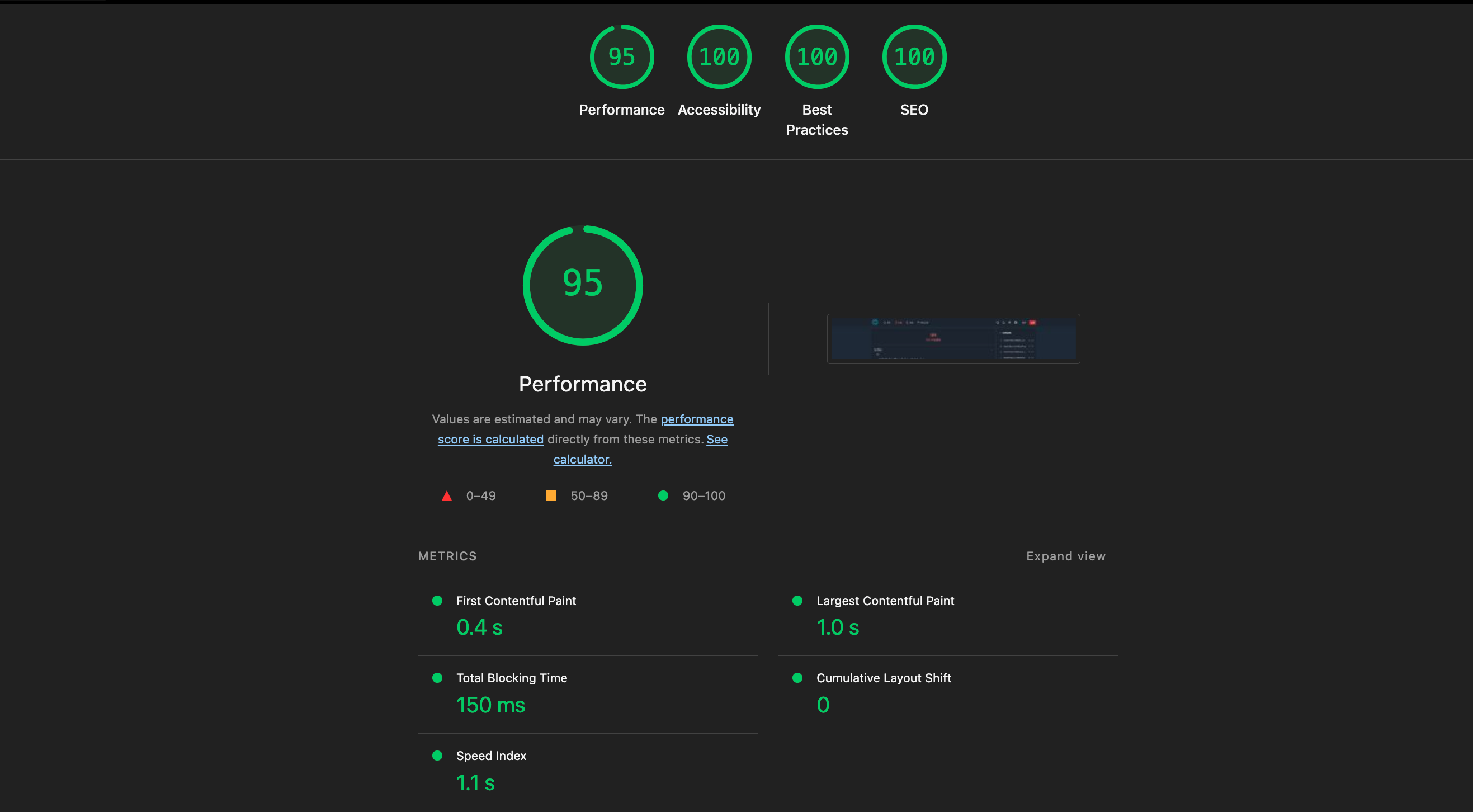
On the official theme demo, scores reach Performance 95 / SEO 100 (your production numbers depend on hosting and content).
For Next.js CMS evaluations, this matters: you should not trade WordPress-style workflow for a slow visitor experience. The default theme exists to prove workflow + speed coexist.
6.4 Live demos
| Demo | URL |
|---|---|
| Production blog | blog.gaoredu.com |
| Theme starter | reactpress-theme-starter.vercel.app |
| Documentation | docs.gaoredu.com |
6.5 Before / after assembly
Before (typical Headless assembly)          With ReactPress
─────────────────────────────────          ─────────────────
Pick CMS backend                      →    reactpress init
Build or customize Admin              →    Admin at /admin/
Develop Next.js visitor site          →    http://localhost:3001
Debug env / ports / DB                →    reactpress doctor
7. Admin: the writing surface
Visitors see the theme. Authors live in Admin. If Admin fails, the platform fails — regardless of API elegance.
7.1 Post editor
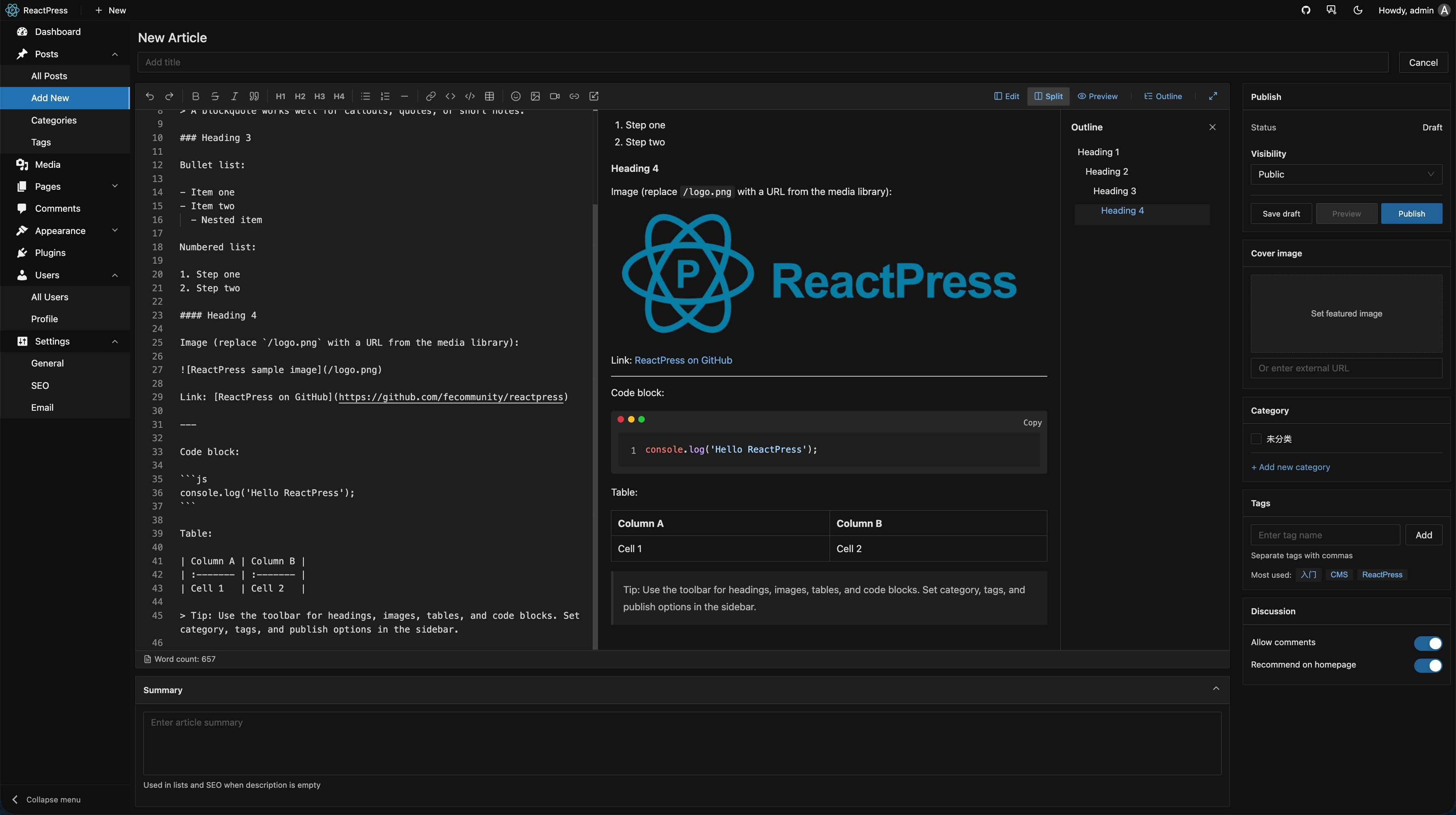
Admin provides:
- Markdown editor with code blocks, tables, paste-to-upload images
- Draft / publish workflow
- Categories and tags
- Pages and knowledge base content types
- Revision history (server-side)
7.2 Media library
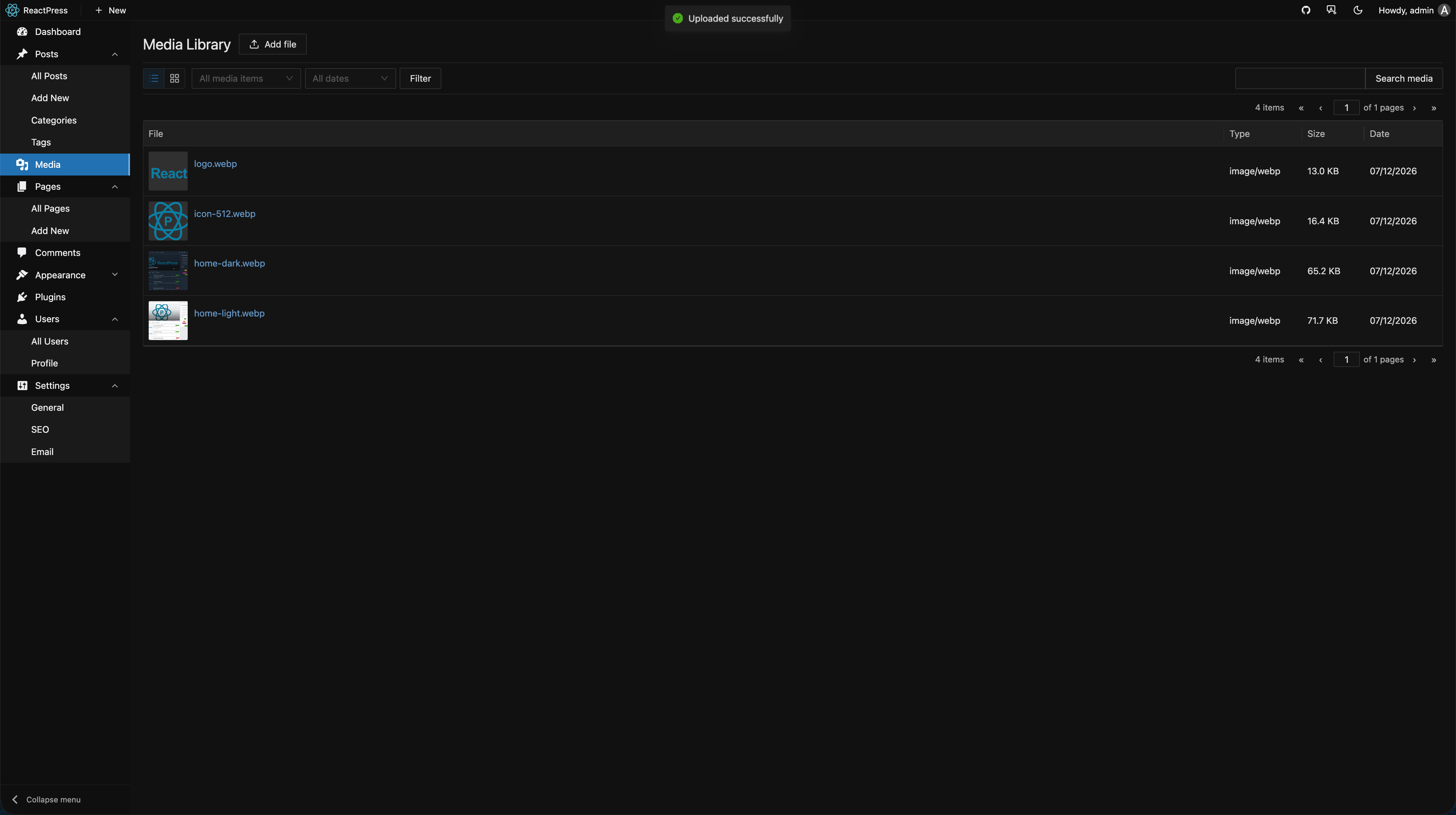
Centralized media under uploads/ with optional OSS configuration (Aliyun OSS supported in server modules). Authors should not FTP files or open S3 consoles for a blog image.
7.3 Plugins panel
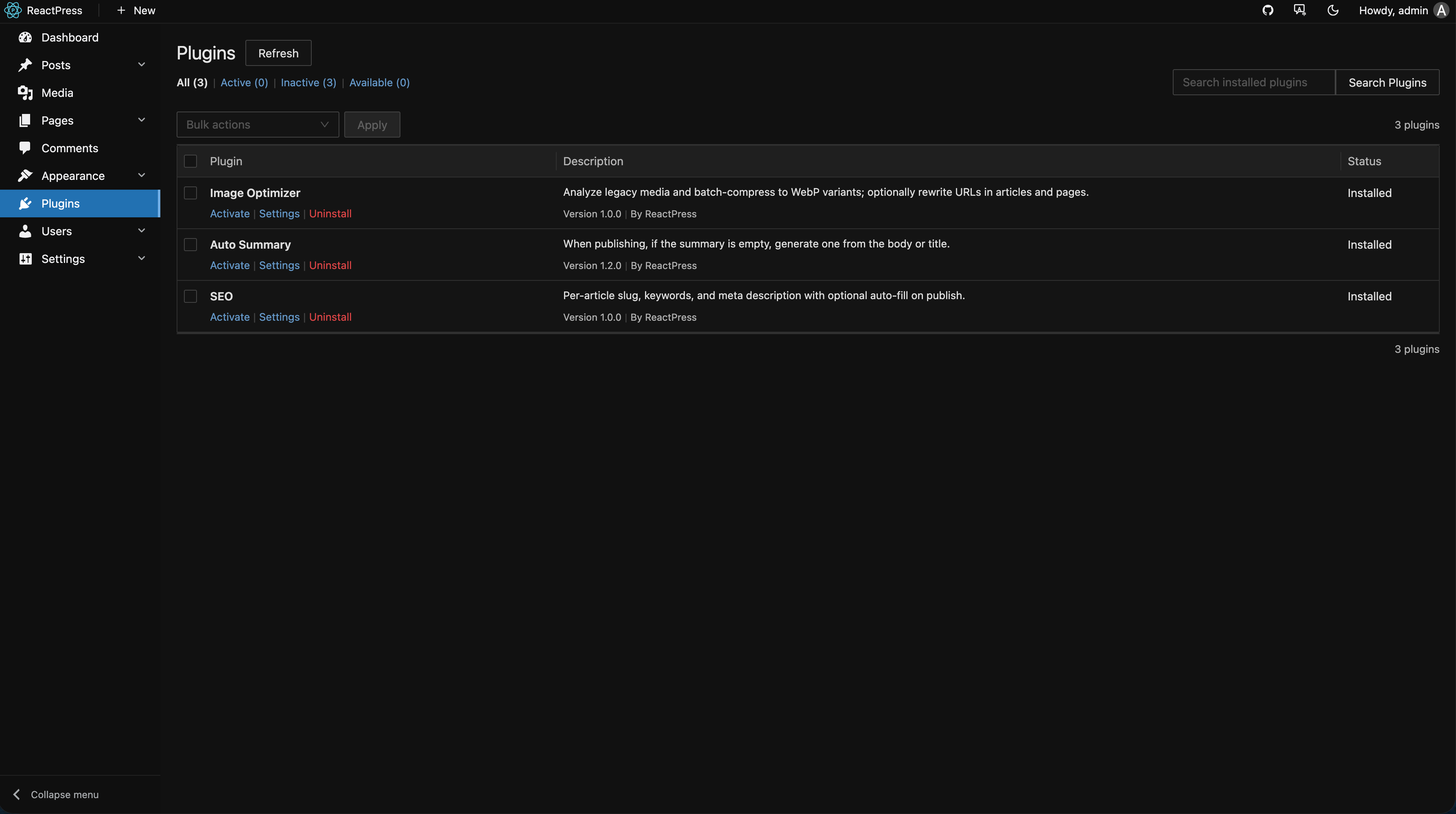
Install, enable, and configure plugins without SSH. Built-in plugins:
| Plugin | Capability |
|---|---|
seo | Slug, keywords, meta description + editor slot |
hello-world | Auto-generate summaries on publish |
image-optimizer | Batch WebP optimization for legacy media |
7.4 Appearance and themes
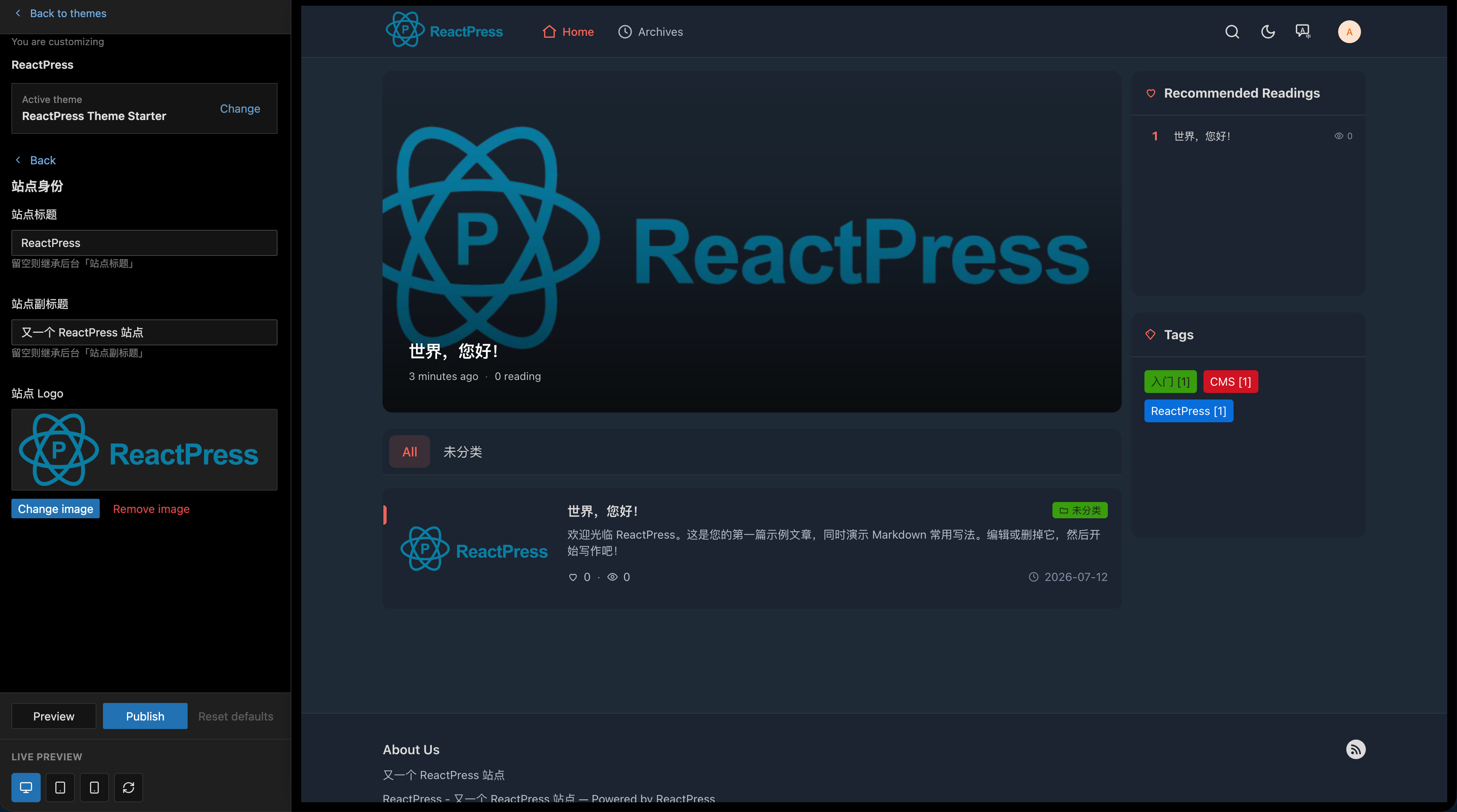
Appearance → Themes — install from registry, preview on :3003, activate for :3001. Swapping themes does not migrate content; it changes presentation only.
7.5 Site settings
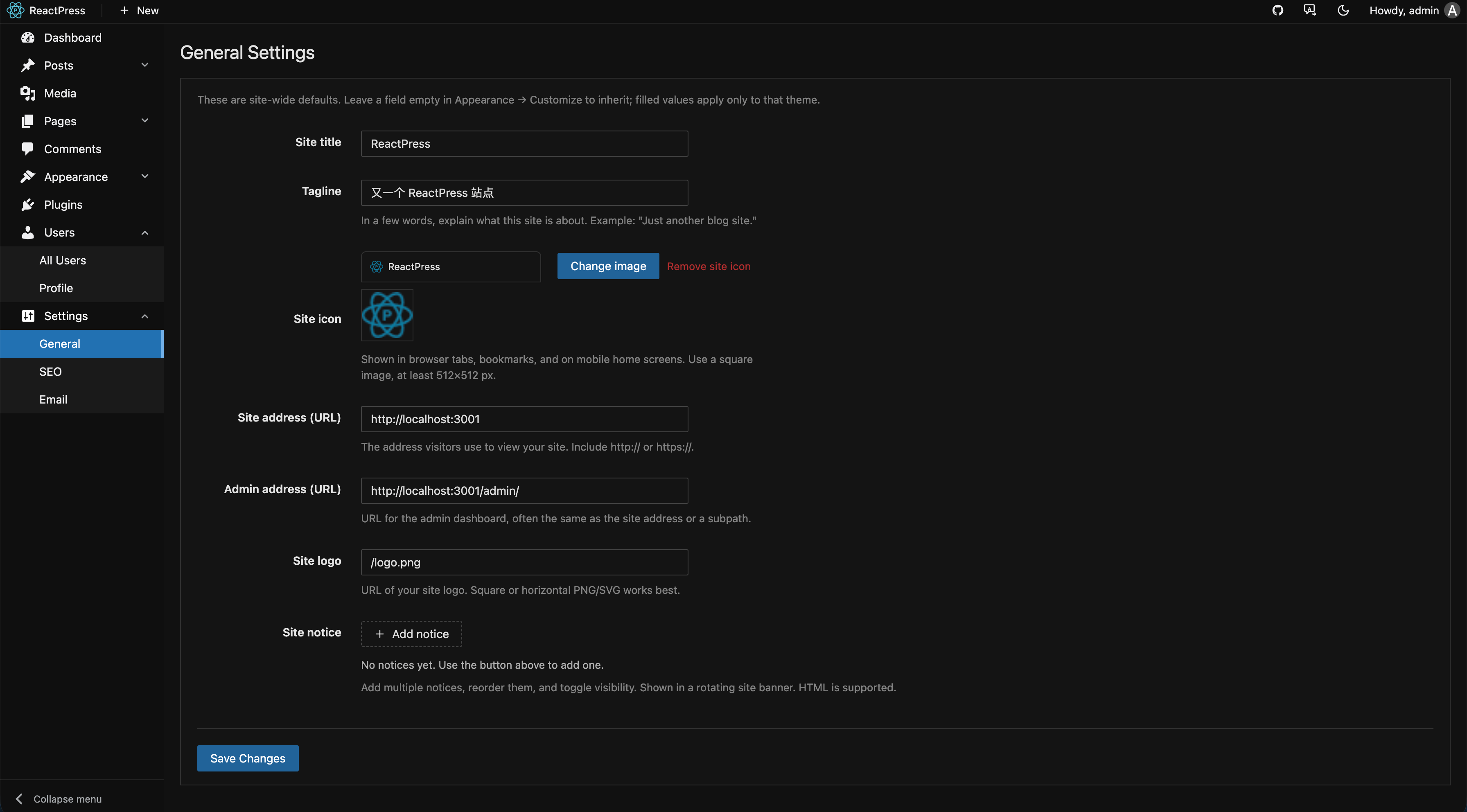
Site title, URLs, API keys, comment policies, and integration settings — the operational layer authors and admins share.
7.6 Comments moderation
Comments flow through API with JWT for creation, server-side HTML sanitization after Markdown parsing (security hardening in 3.7+), and moderation UI in Admin. Stored XSS and spam are platform concerns, not theme afterthoughts.
7.7 Default credentials warning
Local admin / admin is for trial only. Change passwords before production; reactpress doctor surfaces common security omissions.
8. Theme system
Theme = presentation. What visitors see is a replaceable Next.js app.
8.1 Two sources, three layers
┌─────────────────────────────────────────────────────────────┐
│  Sources                                                     │
│    local  themes/{id}/  →  .reactpress/runtime/{id}/          │
│    npm    npm package   →  .reactpress/runtime/{id}/        │
└─────────────────────────────────────────────────────────────┘

┌─────────────────────────────────────────────────────────────┐
│  Layers                                                      │
│    themes/              Registry                             │
│    .reactpress/runtime/ Materialized (CLI runs this)         │
│    DB + active config   Which theme is live on :3001         │
└─────────────────────────────────────────────────────────────┘
8.2 Official themes
| Theme | Source | Use case |
|---|---|---|
| hello-world | Monorepo local | Learning, fork base |
| reactpress-theme-starter | npm catalog | Production — search, KB, comments |
reactpress theme add @fecommunity/reactpress-theme-starter@1.0.0-beta.0
8.3 Mock development without API
npx create-next-app@latest my-blog \
  --example "https://github.com/fecommunity/reactpress-theme-starter" \
  --use-pnpm
cd my-blog && pnpm dev:mock
Theme authors iterate UI without booting full platform — faster design cycles.
8.4 Data fetching in themes
import { createThemeApi } from '@fecommunity/reactpress-toolkit/theme';

const api = createThemeApi({ baseURL: process.env.NEXT_PUBLIC_API_URL });
const { data } = await api.article.list({ status: 'publish', page: 1 });
Environment variables align with reactpress init output (CLIENT_SITE_URL, API URL).
8.5 App Router conventions
Official starter routes (illustrative):
| Route | Purpose |
|---|---|
/ | Home |
/blog/[slug] | Article detail |
/blog | Article list |
/docs/[...slug] | Knowledge base |
/search | Search results |
Customize freely — contract is fetch via Toolkit, not specific folder names.
8.6 SEO responsibilities in themes
As the Next.js CMS visitor layer, themes own:
- SSR/ISR HTML completeness for crawlers
- Per-route
<title>, meta description, OG tags from API fields /sitemap.xmlandrobots.txt- JSON-LD structured data
Admin + SEO plugin write metadata; theme renders it. Change SEO strategy by swapping plugins, not forking themes.
8.7 Deployment patterns for themes
| Pattern | When |
|---|---|
| Unified | API + theme same VPS — reactpress init style |
| Split | Theme on Vercel Edge, API on VPS — classic Jamstack |
| Custom | Mobile app or second Next site via Headless API only |
One content graph, many surfaces — the publishing platform difference.
8.8 Migrating from WordPress themes
There is no magic PHP→JSX converter. You rewrite presentation in React — cost upfront, benefits long-term:
- Reuse design system components
- Storybook and unit tests on UI
- Predictable performance without unknown PHP plugins
Migrate content via WordPress REST export scripts into ReactPress API. ReactPress offers new front end, familiar workflow.
8.9 Theme catalog and version compatibility
theme.json + theme.manifest.schema.json declare requires: ">=4.0.0". CLI blocks silently incompatible installs. Roadmap theme marketplace adds discovery and ratings — WordPress theme shop proved skin-swapping demand; we distribute via npm + Next.js.
9. Plugin system
ReactPress 4.0 (codename Extend) makes Hook + plugin.json a first-class extension model.
Theme = presentation · Plugin = logic
9.1 Lifecycle
Discover → Install → Enable → Configure → (optional) Uninstall
- Admin → Plugins for GUI
- CLI:
reactpress plugin list,reactpress plugin install <id> - Manifest:
plugin.jsondeclares hooks, Admin slots, settings schema
9.2 Registry model
plugins/               Registry (what can be installed)
.reactpress/plugins/   Materialized installed copy + dist
DB globalSetting       Enabled list + per-plugin config
        ↓ activate
HookService            require(module) → register(hooks, ctx)
Aligns with theme three-layer model — authors learn once.
9.3 Server plugin example
import type { PluginContext } from '@fecommunity/reactpress-toolkit/plugin';

export function register(hooks: PluginContext['hooks'], ctx: PluginContext) {
  hooks.addFilter('article.beforePublish', async (article) => {
    if (!article.summary) {
      article.summary = article.content.slice(0, 160);
    }
    return article;
  });
}
Build: pnpm run build:plugins in monorepo; reactpress plugin install for end users.
9.4 Hooks vs webhooks
| Mechanism | Direction | Can mutate data | Example |
|---|---|---|---|
| Hook | In-process inbound | Yes (filters) | SEO validation, auto summary |
| Webhook | Outbound HTTP | No | Slack notify, CI trigger |
Publish pipeline:
article.service
  ├─ applyFilters('article.beforePublish')   ← plugins
  ├─ persist
  ├─ doAction('article.afterPublish')        ← plugins
  └─ webhookService.dispatch('article.published')
9.5 Admin slots
Plugins register UI slots — seo adds fields beside the article editor. Authors experience meta boxes, not scattered settings pages.
9.6 Security
- Manifest JSON Schema validation
- Module path constraints
- Ajv config validation
Stricter than "install zip and hope" — appropriate for self-hosted open source CMS.
9.7 Building your first plugin
Fork plugins/hello-world → rename id → implement register() → pnpm build:plugins → enable in Admin. An afternoon for NestJS-comfortable teams.
WordPress has more hooks today; ReactPress hooks are fewer but fully typed and testable — optimized for engineering teams customizing for themselves.
9.8 SEO plugin collaboration example
seo validates slug uniqueness on article.beforePublish, injects Admin fields, theme SSR reads metaTitle, metaDescription, keywords. Plugin writes, theme reads, core stays dumb — ideal React CMS + Next.js CMS split.
9.9 Honest comparison to WordPress plugins
WordPress: 60,000+ plugins, search-and-install economy.
ReactPress: young catalog, strong mechanism, built-in essentials, best for teams who can code extensions.
If you need off-the-shelf ecommerce, membership, or form builders today, WordPress may win — see ReactPress vs WordPress.
10. Desktop client
WordPress has no true peer for offline-first, local-database writing in the core product. ReactPress Desktop fills that gap.
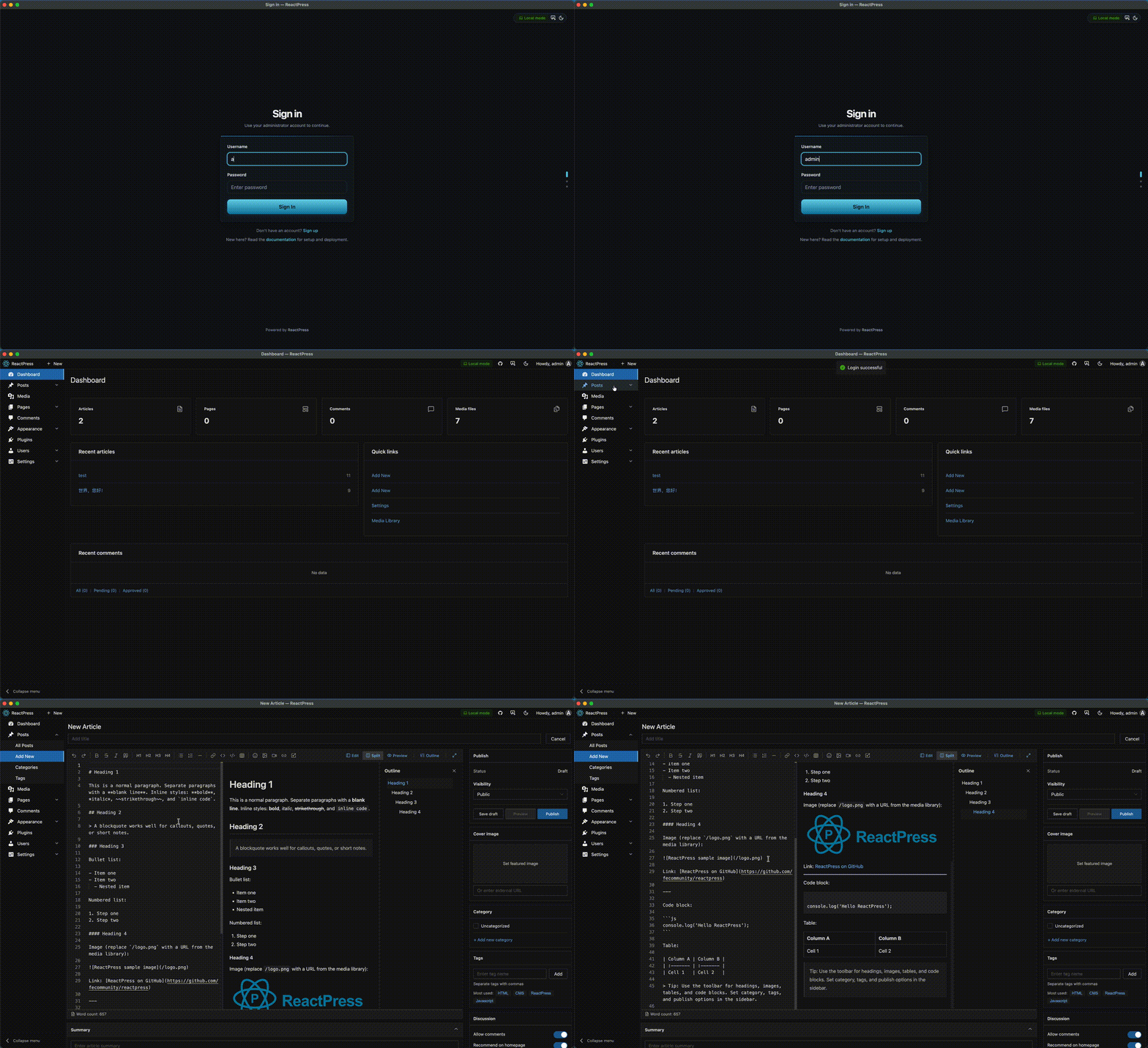
10.1 Architecture
Electron shell + same Admin SPA as web — one UI codebase, consistent behavior, lower maintenance than a separate native editor.
10.2 Modes
| Mode | Scenario | Behavior |
|---|---|---|
| Local (default) | Offline, try without Docker | Embedded SQLite API at 127.0.0.1:3002 |
| Remote | Production/staging API | Admin points at remote REST |
Switch under Settings → Desktop client or workspace panel on login.
10.3 Sync
Local → remote push for articles, pages, and selected settings (requires remote admin JWT). Recommended flow: validate on staging before production push.
10.4 Installers
GitHub Releases ship macOS DMG, Windows NSIS, Linux AppImage via CI matrix builds.
pnpm dev:desktop      # monorepo development
pnpm build:desktop    # installers → desktop/release/
Docs: Desktop client guide.
10.5 vs Notion-class editors
Notion, Google Docs, and wikis draft well but publish poorly to custom-domain Next.js — export steps, style loss, proprietary sync.
Desktop local mode means the writing UI is the production Admin, synced via standard REST — closer to Obsidian drafting + WordPress publishing, integrated and open source.
10.6 Security notes
Sync is one-way push with credentials. Test conflict behavior on staging. Treat like any CMS bulk import — rehearse before production.
11. Headless API
ReactPress is a publishing platform first — and a Headless React CMS by default. Any client that speaks HTTP can participate.
11.1 Explore with Swagger
http://localhost:3002/api
Swagger UI documents routes, parameters, and response shapes — generated from NestJS decorators. Production: https://your-api-domain.com/api.
11.2 Authentication
| Method | Use case |
|---|---|
| Session / JWT | Admin SPA same-origin requests |
API Key (X-API-Key) | Headless servers, scripts, mobile |
Create keys in Admin → Settings → API. Keys carry admin-level power — HTTPS only, rotate regularly, never commit to git.
11.3 Core endpoints
| Method | Path | Description |
|---|---|---|
| GET | /api/health | Health check |
| GET | /api/article/headless/list | Paginated published articles |
| GET | /api/article/:id | Single article |
| GET | /api/page/list | Pages |
| GET | /api/category/list | Categories |
| GET | /api/tag/list | Tags |
| GET | /api/comment/list | Comments |
| GET | /api/setting/public | Public site settings |
| POST | /api/article | Create article (auth required) |
Exact contracts live in Swagger — treat this table as a map, not the spec.
11.4 curl examples
Health:
curl http://localhost:3002/api/health
Published articles:
curl -H "X-API-Key: YOUR_KEY" \
  "http://localhost:3002/api/article/headless/list?status=publish&page=1&pageSize=10"
11.5 Toolkit TypeScript SDK
import { createApiClient } from '@fecommunity/reactpress-toolkit';

const client = createApiClient({
  baseURL: process.env.REACTPRESS_API_URL,
  apiKey: process.env.REACTPRESS_API_KEY,
});

const articles = await client.article.headlessList({
  status: 'publish',
  page: 1,
  pageSize: 10,
});
One SDK for Admin, themes, plugins, and external apps — types track API evolution.
11.6 Headless-only deployments
Run API without caring about the bundled theme:
- Marketing site on a custom Next repo
- Mobile app consuming articles
- Multi-brand networks sharing one content backend
You still benefit from ReactPress Admin for editors. You only opt out of the default visitor theme.
11.7 WordPress REST vs ReactPress Headless
WordPress REST exists but Headless is not the default product story. Field shapes vary with plugins; performance tuning often still assumes PHP rendering.
ReactPress assumes Headless consumers from day one — list endpoints, API keys, Toolkit, and OpenAPI as first-class docs.
11.8 Webhooks for external systems
Beyond in-process Hooks, server dispatches outbound webhooks (e.g. article.published) for Slack, CI, search indexers, or data warehouses — async integration without blocking publish latency.
12. SEO and performance
Teams choose Next.js CMS stacks largely for search visibility and Core Web Vitals. ReactPress splits SEO across plugins (data) and themes (rendering).
12.1 Rendering strategy
| Layer | Strategy | SEO impact |
|---|---|---|
| Admin | CSR (Vite) | Not indexed — correct |
| Theme | SSR / ISR | Full HTML for crawlers |
| API | JSON | Feeds theme and Headless |
12.2 Built-in SEO plugin
Authors set slug, focus keywords, and meta description in Admin. Theme emits:
<title>and meta description- Open Graph and Twitter cards
- Canonical URLs
- JSON-LD (
Article,WebSite, etc. in starter)
12.3 Sitemap and robots
Official theme generates /sitemap.xml and robots.txt from API content — no manual XML editing.
12.4 Performance practices in starter theme
- Next.js code splitting and image optimization
- ISR for high-traffic lists where configured
- Minimal client JS on article pages
- Dark mode without hydration flash (theme-dependent)
Lighthouse 95 Performance / 100 SEO on demo is achievable baseline — not a guarantee for every host.
12.5 ReactPress vs WordPress SEO plugins
WordPress often stacks Yoast or Rank Math on top of theme-dependent markup. ReactPress defaults to structured SEO fields + SSR theme — fewer moving parts for standard blogs and docs.
12.6 Internationalization note
Docs site supports en and zh locales. Themes can implement i18n routes; content model supports multiple sites via settings and custom theme logic — i18n at theme layer keeps core simpler.
12.7 Measuring before launch
- Run Lighthouse on staging theme URL
- Validate rich results with Google Search Console
- Fetch as Google / inspect rendered HTML (not only JSON API)
- Confirm
sitemap.xmllists published URLs only
13. Security model
Self-hosted open source CMS must be safe by default and auditable by admins.
13.1 Highlights (3.7+)
- SQL injection: whitelist filter columns in public list APIs (GHSA-wmw4-mw6x-6vfm)
- Stored XSS: sanitize comment HTML post-Markdown; JWT required for
POST /comment; Helmet CSP headers - Reporting: SECURITY.md
13.2 Plugin sandboxing
Manifest validation, constrained require paths, schema-validated plugin config — reduce "malicious plugin" surface compared to unrestricted PHP includes.
13.3 API keys
Equivalent to admin power. Store in secrets manager; scope CI keys read-only where possible; rotate on team churn.
13.4 Production checklist
- Change default
adminpassword - HTTPS everywhere
- MySQL credentials not in git
- Rate limiting at reverse proxy
- Backup
.reactpress/anduploads/on schedule - Keep
@fecommunity/reactpressupdated for security patches
13.5 Comments attack surface
Public write endpoints are classic XSS/spam targets. Server-side sanitization + auth + CSP is platform duty — themes should not "fix" unsafe HTML alone.
14. Deployment patterns
reactpress init targets local and small self-hosted production. Scale up when traffic demands.
14.1 SQLite → MySQL
Edit .reactpress/config.json database.mode, apply config, migrate data per deployment docs. MySQL suits concurrent writers and larger catalogs.
14.2 Docker Compose
Orchestrate API + theme + reverse proxy + MySQL — good for VPS teams wanting reproducible infra. See Docker deployment.
14.3 PM2 process management
Node processes for API and theme under PM2 on a single VPS — simple middle ground without Kubernetes.
14.4 Split hosting
| Component | Host | Notes |
|---|---|---|
| API | VPS / container | SQLite or MySQL |
| Theme | Vercel / Netlify | NEXT_PUBLIC_API_URL points remote |
| Media | Local disk or OSS | Configure in server settings |
Classic Jamstack + Headless — still using ReactPress Admin for editors.
14.5 Backups
# SQLite + uploads snapshot
tar czf backup-$(date +%F).tar.gz .reactpress uploads
For MySQL, add mysqldump to cron. Test restores quarterly — backups are wishes until restored.
14.6 CI/CD
- Theme repo: deploy on push to
main - API: deploy on tag or manual workflow
- Content: lives in DB — not redeployed with theme unless static export pattern
Separate content lifecycle from code lifecycle — another WordPress lesson.
14.7 Environment variables
CLI generates .env from .reactpress/config.json. Avoid hand-editing unless you understand sync direction — reactpress config --apply is safer.
15. Migration paths
15.1 New sites
npm i -g @fecommunity/reactpress
mkdir my-site && cd my-site
reactpress init
Fastest path to a React publishing platform proof of concept.
15.2 ReactPress 3.x → 4.0
4.0 adds plugins, desktop, npm theme catalog — no forced breaking config migration.
npm i -g @fecommunity/reactpress
cd your-site
reactpress doctor
Optional: enable hello-world / seo plugins; try reactpress-theme-starter; install desktop client.
Guide: 3.x → 4.0 migration.
15.3 WordPress → ReactPress
| Asset | Migration approach |
|---|---|
| Posts / pages | WordPress REST export → script → ReactPress API |
| Media | Download uploads; re-upload or mirror URLs |
| Categories/tags | Map taxonomy via API |
| Theme | Rewrite in Next.js — plan engineering time |
| Plugins | Reimplement critical logic as ReactPress plugins |
Expect theme rewrite as main cost — not data model translation.
15.4 Strapi / other Headless → ReactPress
If you already shaped content in another Headless CMS, write import scripts against ReactPress POST endpoints or DB seed tools. You may adopt ReactPress Admin gradually while keeping an existing front end temporarily via parallel APIs.
15.5 Static Markdown repos → ReactPress
Many teams store posts in content/*.md. Import scripts can create articles via API, preserving slugs and dates. Editors then use Admin for new content — Git-as-CMS graduations without losing history.
16. Who should use ReactPress
16.1 Fit matrix
| Scenario | Why ReactPress fits |
|---|---|
| Personal dev blog | Admin + fast Next theme |
| Open source docs + changelog | Knowledge base + articles in one theme |
| SaaS marketing site | Headless API + custom Next front |
| Multi-editor teams | Admin for writers, theme repo for engineers |
| Offline-first authors | Desktop + SQLite + sync |
| WordPress alternative evaluation | Familiar workflow, modern stack |
16.2 User stories
Alice — indie developer
Uses Next.js for side projects; hates git commit per typo fix. reactpress init, publishes Sunday afternoon, Lighthouse green, VPS serves :3001. No Strapi, no PHP.
Open source maintainers
Docs versioned in knowledge base API; release notes as articles; same theme, different routes. Contributors use Admin; engineers keep custom React components in theme Git.
Marketing + front-end parallel
Marketing schedules drafts in Admin; front-end fork theme-starter for brand motion; plugin Hook posts to Slack on article.afterPublish. Nobody pastes Markdown into production code.
16.3 Self-assessment checklist
ReactPress is likely worth a trial if ≥3 are true:
- Primary stack is React / Next.js
- Non-developers must publish
- Self-hosted open source required
- Tired of maintaining CMS + front end + deploy separately
- Evaluated WordPress, want to avoid PHP
- Care about SSR SEO and Core Web Vitals
- Want offline or local-first writing
16.4 When to choose WordPress instead
- Need mature plugin marketplace (ecommerce, memberships, complex forms)
- Large existing WordPress theme/plugin investment
- Fully non-technical team depends on off-the-shelf plugins without engineering
Honest comparison: ReactPress vs WordPress.
16.5 When to choose pure Headless
- Mobile-only product consuming content
- Content model changes weekly in early product discovery
- You already invested in Strapi/Payload and only need a new Next front end
ReactPress shines when Admin + default theme + CLI matter — not API-only experiments.
17. Roadmap
4.0 is the extensible base, not the finish line.
17.1 Near term (4.x)
- Plugin npm catalog and
reactpress plugin createscaffold - Desktop auto-update, tray icon, global shortcuts
reactpress theme createscaffold- Theme and plugin marketplace — discovery, versions, compatibility hints
17.2 Medium term
- More official plugins (spam filtering, analytics, i18n helpers)
- Managed hosting partnerships — WordPress-style one-click for ReactPress
- Multi-site / multi-tenant for agencies
- Deeper AI writing integrations via plugin Hooks
17.3 Long-term vision
"React stack default for publishing" should be as easy to say as WordPress.
When someone asks "what do we use for the company blog?", answers should include:
npm i -g @fecommunity/reactpress
reactpress init
17.4 How to contribute
- Publish themes to npm catalog
- Share migration scripts from WordPress or Strapi
- Contribute plugins as examples
- File Issues with reproduction steps
React's WordPress will not appear by accident — it will be built by developers tired of assembly.
18. FAQ
Is ReactPress free?
Yes. MIT license. Commercial use allowed. Self-host without vendor fees.
Is 4.0 production-ready?
Yes. 4.0.0 is the current stable release on npm (@fecommunity/reactpress). Core paths (init, Admin, API, theme, plugins) are battle-tested in community and dogfood sites like blog.gaoredu.com. When upgrading from 3.x, validate on staging; read migration guide.
Do I need Docker?
No for default CLI flow — SQLite embedded. Docker/MySQL when you configure embedded-docker or external database in .reactpress/config.json.
Can I use my own front end?
Yes. Headless REST + API Key + Toolkit SDK. Fork theme-starter or build from scratch against /api/article, etc.
How is this different from WordPress?
Same admin-driven publishing workflow, but default Next.js performance, cleaner Headless path, and no PHP theme/plugin entropy for JS teams.
WordPress alternative? Headless CMS? Next.js blog?
All three: self-hosted WordPress-style editing, Headless REST for custom apps, official Next theme with strong Lighthouse defaults.
How does ReactPress compare to Strapi or Payload?
They primarily ship content APIs. ReactPress ships API + Admin + theme + plugins + CLI + desktop — a React publishing platform, not only a backend.
Can I migrate from WordPress?
Content yes (scripts/REST). Theme requires Next.js rewrite. Plan engineering for presentation layer.
Where is documentation?
docs.gaoredu.com — installation, architecture, plugin/theme development, deployment, desktop client.
How do I report security issues?
Follow SECURITY.md. Do not post exploitable details in public Issues first.
What Node version is required?
Node.js 20+ for current CLI releases.
Does ReactPress support MySQL?
Yes — configure in .reactpress/config.json for production workloads beyond SQLite.
Can I run API-only?
Yes — Headless consumers use API + Admin; visitor theme optional if you bring your own Next app.
How do plugins differ from themes?
Themes change visitor UI. Plugins change server logic via Hooks — SEO rules, summaries, integrations.
Is the desktop app required?
No. It is optional for offline/local-first authors. Web Admin is complete.
How do updates work?
npm i -g @fecommunity/reactpress@latest for CLI; reactpress doctor after upgrade; review changelog at /blog.
19. Getting started
19.1 Install CLI
npm i -g @fecommunity/reactpress
Install with npm i -g @fecommunity/reactpress (@latest). Prereleases use @beta — check npm.
19.2 Initialize site
mkdir my-blog && cd my-blog
reactpress init
19.3 Verify services
| Check | Command / URL |
|---|---|
| Health | curl http://localhost:3002/api/health |
| Admin | http://localhost:3001/admin/ |
| Public | http://localhost:3001 |
19.4 First article
- Log in to Admin
- Create article with title, Markdown body, category
- Enable SEO plugin — fill meta description
- Publish
- View on public site — confirm SSR source in browser devtools
19.5 Install official theme (optional)
reactpress theme add @fecommunity/reactpress-theme-starter@1.0.0-beta.0
Enable in Appearance → Themes.
19.6 Enable plugins
Plugins → Install → Enable seo and hello-world. Edit an article — observe SEO slot and auto-summary on publish.
19.7 Try desktop (optional)
Download from GitHub Releases or pnpm build:desktop from monorepo.
19.8 Next steps in docs
- 5-minute first site
- Core concepts
- Architecture overview
- Plugin development
- Theme development
- Headless API
19.9 Star and feedback
If ReactPress saves you a weekend of CMS assembly, a GitHub star helps the next developer searching React CMS or WordPress alternative find this path.
Appendix A: Extended comparison matrices
A.1 ReactPress vs WordPress (2026)
| Dimension | ReactPress | WordPress |
|---|---|---|
| Positioning | Full React publishing platform | General-purpose PHP CMS |
| Stack | React, Next.js, NestJS, SQLite/MySQL | PHP, MySQL, PHP themes |
| Time to first post | ~60 seconds (init) | Minutes on managed host |
| Default visitor tech | Next.js SSR/ISR | PHP templates |
| Headless | Native REST + API keys | Plugins + REST, not default |
| Plugin economy | Young; Hook + npm catalog roadmap | 60,000+ plugins |
| Theme economy | npm Next.js themes | Massive PHP theme market |
| Offline writing | Electron desktop | Third-party editors |
| Performance ceiling | High with official theme | Highly variable |
| Best for | React teams, SSR SEO, self-hosted JS stack | Non-technical users, plugin-heavy sites |
A.2 ReactPress vs Headless CMS assembly
| Task | Strapi + Next (typical) | ReactPress |
|---|---|---|
| Install backend | Docker / cloud / VPS | reactpress init |
| Admin for authors | Strapi Admin (customizable) | Bundled Vite Admin |
| Visitor site | Build from scratch | Official theme included |
| SEO baseline | Implement in Next | Plugin + theme defaults |
| Comments | Build or embed | Platform module |
| Media | Configure upload provider | uploads/ + OSS option |
| CLI diagnostics | None unified | reactpress doctor |
| Desktop offline | N/A | Electron client |
A.3 ReactPress vs static Git workflow
| Dimension | Markdown in Git + CI | ReactPress |
|---|---|---|
| Non-dev publishing | Poor — PR workflow | Strong — Admin |
| Build on every typo | Often yes | No — runtime CMS |
| Lighthouse | Excellent | Excellent (theme) |
| Preview drafts | Branch previews | Admin preview + API |
| Plugin extensibility | GitHub Actions scripts | Hook plugins |
| Data portability | Files in repo | DB + exports |
A.4 When each approach wins
| Approach | Win when |
|---|---|
| WordPress | Plugin marketplace is core requirement |
| Headless only | Many channels, custom content models, API-first org |
| SSG / Git | Developers only, infrequent publishes |
| ReactPress | React stack + editorial workflow + self-hosted platform |
Appendix B: ReactPress version history
Understanding 4.0 requires the iterations that shaped it.
B.1 2.x — proof of concept
Early packages split across names (reactpress-cli, reactpress-server, client packages). Power users could assemble a stack; newcomers faced decision fatigue the WordPress model avoids.
Lesson: fragmentation kills "default stack" status.
B.2 3.0 Platform — one CLI
Codename Platform. Goals:
- Zero config —
init+dev, embedded Docker MySQL default - Single entry —
@fecommunity/reactpressglobally - DX — interactive menu,
doctor,status
Proved ~60 second cold start after global install. Docker MySQL helped production parity but felt heavy for "try on laptop."
Lesson: speed of first article beats production parity on day zero.
B.3 3.1+ Toolkit modern stack
Unified @fecommunity/reactpress-toolkit contracts; Next.js 14 / React 18 alignment; theme development helpers. Reduced API client drift between Admin and themes.
Lesson: platforms need a contract layer more than more features.
B.4 3.7 Security hardening
SQL injection whitelist in public list filters; stored XSS fixes in comments; JWT for comment POST; Helmet CSP. Reported by community researchers — see changelog.
Lesson: publishing platforms are security boundaries, not side projects.
B.5 4.0 Extend — plugins, desktop, npm themes
Codename Extend. SQLite default, bundled CLI runtime (zero extra npm deps), Hook plugins, Electron desktop, theme catalog, cross-platform desktop CI.
Lesson: the base machine was ready; extensibility and author scenarios were next.
B.6 4.0.0 stable promotion
npm @latest promotion, desktop installers on Releases, docs at docs.gaoredu.com, README and media refresh.
Appendix C: Module deep dive — server
The NestJS server is the trust boundary for data, auth, Hooks, and webhooks.
C.1 Module overview
| Module area | Responsibility |
|---|---|
article | CRUD, publish workflow, revisions, Headless list |
page | Static pages |
category / tag | Taxonomy |
comment | Moderation, sanitization |
file | Uploads, optimization hooks |
knowledge | Knowledge base entities |
extension | Theme/plugin registration |
bootstrap | First-run setup |
setting | Site and API key settings |
C.2 Publish pipeline (conceptual)
When an author clicks Publish:
- Admin sends authenticated request via Toolkit
article.serviceloads draft, validates fieldsHookService.applyFilters('article.beforePublish')— plugins adjust summary, SEO slug, etc.- Persist to SQLite/MySQL with status
publish HookService.doAction('article.afterPublish')— side effectswebhookService.dispatch— external systems- Theme ISR/SSR fetches updated content on next request
Understanding this pipeline explains where plugins belong (steps 3–6) and where themes belong (step 7).
C.3 Database options
| Mode | When |
|---|---|
| SQLite | Local dev, solo blogs, desktop local mode |
| MySQL | Concurrent editors, larger catalogs, managed DB |
TypeORM entities live in server; themes never import them.
C.4 Public vs authenticated routes
Headless list endpoints expose published content suitable for CDNs and static regeneration. Mutations require JWT or API key. Fail closed on auth — publishing platforms must not leak draft content through misconfigured caches.
Appendix D: Module deep dive — Admin (web)
Admin is a Vite + React SPA optimized for interactive editing — no SSR required.
D.1 Why SPA for Admin
Admin users are authenticated; SEO irrelevant. SPA enables fast interactions, rich editors, and client-side routing without Next.js server complexity on the same port as theme.
D.2 List state in URL
List views (articles, media, comments) sync filters to searchParams — shareable URLs, refresh-safe state. Small DX choice that matters for support ("send me the link to that filtered view").
D.3 Plugin Admin slots
AdminSlot + PluginAdminProvider let plugins render React UI beside core screens. The SEO plugin's article sidebar is the reference implementation — authors see contextual configuration, not a separate plugin app.
D.4 API proxy in production
Visitor port :3001 reverse-proxies /admin/ to Admin assets and API paths to :3002. Authors experience one origin — simpler cookies and CORS mental model.
Appendix E: Module deep dive — CLI
@fecommunity/reactpress is the only package end users must know.
E.1 Commands
| Command | Action |
|---|---|
reactpress / reactpress init | Initialize and start stack |
reactpress init --force | Re-initialize existing project |
reactpress doctor | Diagnose Node, ports, DB, URLs |
reactpress logs | Tail API logs |
reactpress stop | Stop API and site processes |
reactpress plugin list/install | Plugin management |
reactpress theme add | Install npm theme |
E.2 Bundled runtime (4.0)
CLI tarball embeds toolkit and server runtime — global install does not pull six peer packages. This mirrors how WordPress ships "the thing you need" not "the composer graph you must understand."
E.3 doctor philosophy
When a user says "it doesn't work," the first response should not be "read architecture docs." doctor checks Node version, port collisions, database file permissions, and health endpoints — support automation as product feature.
E.4 Process orchestration
CLI spawns and supervises API process, theme dev/prod server, and optionally Admin in monorepo dev. Users think in one command; CLI thinks in multi-process supervision.
Appendix F: Content model reference
| Entity | Purpose | Theme exposure |
|---|---|---|
| Article | Blog posts, news | /blog/[slug] |
| Page | About, landing | Custom routes |
| Knowledge | Docs tree | /docs/[...slug] |
| Category | Grouping | Archives, filters |
| Tag | Labels | Tag pages |
| Comment | Discussion | Article threads |
| Media | Images, files | URLs in Markdown |
| Setting | Site config | Public vs private keys |
Plugins may add derived fields (SEO metadata) without new tables in simple cases — stored on article JSON or extension columns per plugin design.
Appendix G: Troubleshooting guide
| Symptom | Likely cause | Fix |
|---|---|---|
| Port 3001 in use | Another process | reactpress doctor, change port in config |
| API health fails | DB lock or crash | reactpress logs, check SQLite permissions |
| Admin 404 | Theme proxy misconfig | Re-run init, verify .reactpress/config.json |
| Theme blank | API URL wrong | Check NEXT_PUBLIC_API_URL in theme env |
| Plugin not loading | Not built / not enabled | pnpm build:plugins, enable in Admin |
| Desktop cannot sync | CORS / auth | Verify remote API URL and admin JWT |
| Images 404 | uploads/ path | Confirm file module and disk permissions |
Full reference: Troubleshooting docs.
Appendix H: Glossary
| Term | Meaning |
|---|---|
| Publishing platform | API + Admin + visitor delivery + tooling as one product category |
| Headless CMS | Content API with separate presentation responsibility |
| Theme | Swappable Next.js visitor application |
| Plugin | Server-side Hook extension via plugin.json |
| Toolkit | @fecommunity/reactpress-toolkit shared types and HTTP clients |
| Hook | In-process filter/action extension point |
| Webhook | Outbound HTTP notification on events |
| Registry | Source-of-truth list of installable themes/plugins |
| Materialized | Copied build under .reactpress/ ready to run |
| Extend | ReactPress 4.0 codename — plugins, desktop, catalogs |
Appendix I: SEO keyword guide (for authors republishing this article)
If you adapt this content for your own blog, these natural keyword clusters performed well in our research:
Primary: React CMS · Next.js CMS · WordPress alternative · React publishing platform · Open source CMS
Secondary: self-hosted blog · headless REST API · Electron writing app · NestJS CMS · npm theme · Hook plugin system
Long-tail: "wordpress alternative react", "next.js cms self hosted", "open source publishing platform react", "strapi alternative complete platform"
Place keywords in title, first 100 words, one H2, image alt text, and meta description — not stuffed in every paragraph.
Appendix J: Licensing and commercial use
ReactPress is MIT licensed. You may:
- Use commercially without royalty
- Modify and redistribute
- Fork for private platforms
You must:
- Include license notice in distributions
- Accept software AS IS
No trademark grant — "ReactPress" branding should not imply official endorsement of unaffiliated forks without clarity.
Appendix K: Building a content team on ReactPress
K.1 Roles
| Role | Tooling |
|---|---|
| Author | Admin or Desktop |
| Editor | Admin moderation, schedules |
| Designer | Theme repo, Storybook |
| Engineer | Plugins, API, deploy |
| SEO | SEO plugin fields + Search Console |
K.2 Editorial workflow example
- Author drafts in Desktop offline on flight
- Sync to staging API on landing
- Editor reviews in Admin, requests changes via comments
- SEO owner fills meta fields in plugin slot
- Editor publishes — Hook notifies Slack
- Theme ISR shows new article within seconds
- Sitemap regenerates on next crawl
K.3 Governance
- Production API keys only on server secrets
- Staging Admin for training new authors
- Plugin installs restricted to engineers
- Theme changes via PR + preview deployment
This is how React publishing platforms replace "email Word doc to developer" workflows without returning to PHP.
Appendix L: Future of the React publishing category
We predict five trends:
- Consolidation — teams tired of five-repo Headless assembly seek platforms
- AI plugins — summary, tagging, translation via Hook points, not core bloat
- Edge themes — Next on Vercel + central API becomes default split pattern
- Marketplaces — npm-distributed themes/plugins with semver contracts
- Desktop resurgence — local-first writing returns as latency and travel return
ReactPress 4.0 positions on all five — not with hype, with shipping code.
Appendix M: Detailed walkthrough — first production week
This appendix narrates a realistic first week deploying ReactPress as a WordPress alternative for a ten-person startup marketing site.
M.1 Day 1 — Proof of concept
The lead engineer runs:
npm i -g @fecommunity/reactpress
mkdir acme-blog && cd acme-blog
reactpress init
She shares screenshots in Slack: Admin at /admin/, public site on :3001, Lighthouse run on default theme. Product approves direction — no Strapi sprint.
M.2 Day 2 — Theme fork
Design wants custom typography. Engineer forks reactpress-theme-starter, connects pnpm dev:mock for UI-only iteration, then points NEXT_PUBLIC_API_URL at local API. Brand colors ship in theme Git — content untouched in CMS.
M.3 Day 3 — SEO and analytics
Enable seo plugin. Configure site settings (title, description, social image). Add Google Search Console verification file as static asset in theme public/. Plugin Hook stub queued for Plausible script injection — logic in plugin, not hacked in theme layout.
M.4 Day 4 — Staging VPS
Provision small VPS. reactpress init on staging with MySQL mode. reactpress doctor clean. TLS via Caddy reverse proxy. Marketing creates accounts, practices drafts.
M.5 Day 5 — Content migration
Script pulls 40 WordPress posts via REST, maps to ReactPress POST /api/article. Media downloaded to uploads/. Slugs preserved. Theme routes verified — redirect map added in Next config for changed paths only.
M.6 Day 6 — Comments and moderation
Enable comments in settings. JWT flow tested. Akismet-style plugin planned for 4.x catalog; until then, moderation queue in Admin daily.
M.7 Day 7 — Go live
DNS cutover. Monitor API logs via reactpress logs. First organic search impressions in Search Console within two weeks — SSR confirmed via "View page source."
Total engineering time: far below a greenfield Headless + Next build. Total repos: one site directory + one theme fork.
Appendix N: Strapi vs Payload vs ReactPress (feature-level)
N.1 Content modeling
| Capability | Strapi | Payload | ReactPress |
|---|---|---|---|
| Custom content types | Core strength | Core strength | Opinionated core types |
| Field-level plugins | Via extensions | Hooks | Hook filters on entities |
| Relations | Rich | Rich | Categories, tags, knowledge tree |
| Draft/publish | Yes | Yes | Yes |
| Revisions | Varies | Yes | Article revisions |
Takeaway: if you need exotic content graphs (marketplace listings, multi-tenant products), Headless may fit better. If you need articles, pages, docs, media, ReactPress defaults suffice.
N.2 Author experience
Strapi Admin is customizable but still "configure the CMS" energy. Payload Admin is React-native and beloved by developers. ReactPress Admin is narrower and opinionated for publishing — closer to WordPress task focus than infinite schema admin.
N.3 Developer experience
Strapi/Payload excel when the API is the product you sell to internal teams.
ReactPress excels when the published site is the product and API is implementation detail — classic marketing site / blog / docs.
N.4 Total repositories
| Approach | Typical repo count |
|---|---|
| Strapi + Next | 2–4 |
| Payload + Next | 2–4 |
| ReactPress | 1 (+ optional theme fork) |
Fewer repos ≠ simpler architecture automatically — but fewer integration surfaces reduce bus factor and on-call pages.
Appendix O: WordPress timeline — lessons for ReactPress
| Year | WordPress milestone | Lesson for React |
|---|---|---|
| 2003 | Fork of b2/cafelog | Start from real user pain, not abstract framework |
| 2005 | Themes directory | Distribution creates ecosystem |
| 2010 | Custom post types | Extensibility without fork |
| 2012 | REST API plugins emerge | Headless demand appears early |
| 2015 | REST in core | API becomes standard, still not default UX |
| 2018 | Gutenberg | Writing UI is product differentiator |
| 2020s | Headless agencies | Developers want JS front, keep wp-admin |
React is at the "2012–2015 REST plugins" moment — API exists everywhere, integrated platform does not. ReactPress bets the integrated platform is the missing layer.
Appendix P: Performance tuning checklist
P.1 Theme layer
- Enable ISR on high-traffic list pages
- Use
next/imagefor media URLs from API - Limit client-side JS on article template
- Prefetch critical navigation only
P.2 API layer
- Move SQLite → MySQL before traffic spikes
- Put API behind CDN only for public GET routes — never cache authenticated responses
- Enable gzip/brotli at reverse proxy
P.3 Media layer
- Run
image-optimizerplugin on legacy PNG/JPEG uploads - Consider OSS CDN for
uploads/in production China/global split
P.4 Admin layer
- Admin CSR acceptable — do not SSR Admin for "performance scores"
- Keep heavy plugin UI lazy-loaded in slots
Appendix Q: International teams
ReactPress docs ship in English and Chinese (docs.gaoredu.com i18n). Core Admin UI strings are localization-ready via toolkit locale files.
For multi-language content:
- Option A: category per locale (simple)
- Option B: custom plugin adding
localefield + theme routing/en/blog,/zh/blog - Option C: separate ReactPress instances per region (operational isolation)
Core stays lean; i18n is a plugin/theme concern — same WordPress pattern (WPML, Polylang as plugins, not core bloat).
Appendix R: Common objections answered
"Just use WordPress with Headless."
Valid if you already run WordPress and only need a Next front. Greenfield JS teams still inherit PHP ops, plugin security reviews, and dual-stack hiring. ReactPress is single-stack publishing.
"Just use MDX in the repo."
Valid for solo devs who love Git. Breaks down when marketing hires a non-developer author — then you rebuild CMS features in ad-hoc Google Docs workflows.
"Platforms are opinionated — we'll outgrow it."
True for exotic marketplaces. Most blogs, docs, and marketing sites do not outgrow articles + pages + media. Escape hatches exist: Headless API, custom theme, plugins.
"Another CMS nobody asked for."
Fair skepticism. ReactPress growth is community-driven (FECommunity, contributors, dogfood on gaoredu.com). Niche: React teams wanting WordPress workflow — a large niche given React's market share.
"Electron desktop is niche."
So was laptop computing until remote work. Offline writing is peak niche until airplane Wi-Fi fails — then it's essential.
Appendix S: Code reference — theme page example
Illustrative article page pattern (simplified):
// theme: app/blog/[slug]/page.tsx
import { createThemeApi } from '@fecommunity/reactpress-toolkit/theme';
import { notFound } from 'next/navigation';

const api = createThemeApi({ baseURL: process.env.NEXT_PUBLIC_API_URL! });

export async function generateMetadata({ params }: { params: { slug: string } }) {
  const article = await api.article.bySlug(params.slug);
  if (!article) return {};
  return {
    title: article.metaTitle ?? article.title,
    description: article.metaDescription ?? article.summary,
    openGraph: { images: article.cover ? [article.cover] : [] },
  };
}

export default async function ArticlePage({ params }: { params: { slug: string } }) {
  const article = await api.article.bySlug(params.slug);
  if (!article) notFound();
  return (
    <article>
      <h1>{article.title}</h1>
      <div dangerouslySetInnerHTML={{ __html: article.html }} />
    </article>
  );
}
Real starter theme adds layout, JSON-LD, comments, and ISR — but the contract is always API → SSR.
Appendix T: Code reference — plugin filter chain
Multiple plugins can subscribe to one Hook — execution order matters for filters:
// Plugin A — enforce slug format
hooks.addFilter('article.beforePublish', async (article) => {
  article.slug = article.slug.toLowerCase().replace(/\s+/g, '-');
  return article;
});

// Plugin B — default summary
hooks.addFilter('article.beforePublish', async (article) => {
  if (!article.summary) article.summary = article.content.slice(0, 160);
  return article;
});
HookService applies filters sequentially; each receives previous output. Composable publishing rules without merging PRs into core.
Appendix U: Operations runbook (minimal)
Daily
- Glance Admin comment queue
- Check disk space for
uploads/and SQLite file
Weekly
npm i -g @fecommunity/reactpress@lateston servers if release notes mention security- Review API error logs via
reactpress logs
Monthly
- Restore test from backup tarball
- Rotate API keys if team changes
- Lighthouse spot check on top URLs
Incident: site down
reactpress doctorcurl /api/health- Check reverse proxy TLS cert expiry
- Restart processes via
reactpress stopthen start command from your deploy docs
Appendix V: Why MIT license
We chose MIT over copyleft to maximize adoption:
- Corporate blogs without legal friction
- Agencies white-labeling internal platforms
- Theme authors selling premium skins without GPL contagion concerns
Copyleft has noble goals; platform standards often spread through permissive licenses (BSD Unix, MIT React ecosystem). Data still belongs to operators — license does not cloud-host your posts.
Appendix W: Reading list
Further reading for publishing platform designers:
- WordPress Plugin Handbook — Hook mental models
- Next.js App Router docs — SSR/ISR semantics
- NestJS modular architecture — extension boundaries
- ReactPress ARCHITECTURE.md
- ReactPress vs WordPress doc
- ReactPress 4.0 guide
Appendix X: Document changelog
| Date | Change |
|---|---|
| 2026-07-12 | Initial long-form English edition with architecture diagrams, Admin screenshots, GIF demos, appendices A–X |
Appendix Y: Full FAQ extended edition
Installation and environment
Q: Does ReactPress run on Windows?
A: Yes for CLI and Desktop. Windows 10+ supported for Electron installer. WSL also works for CLI workflows.
Q: Apple Silicon Mac support?
A: Yes — DMG builds include arm64. Desktop CI matrix covers macOS architectures.
Q: Can I run multiple sites on one machine?
A: Yes — separate directories per site, distinct ports in each .reactpress/config.json.
Q: Node 18 works?
A: Current releases target Node 20+. Use reactpress doctor to verify.
Content and editing
Q: WYSIWYG editor instead of Markdown?
A: Default is Markdown for technical audiences. Rich text can be added via Admin customization or plugins — not core default today.
Q: Scheduled publishing?
A: Check current server article module for schedule fields in your release; roadmap items may expand cron publishing.
Q: Multi-author roles?
A: Admin supports role separation via server auth module — see docs for current role matrix.
Q: Knowledge base vs articles?
A: Separate content types — articles for chronological blog, knowledge for hierarchical docs.
Themes and front end
Q: Remix or Astro instead of Next?
A: Use Headless API + those frameworks. Default bundled theme is Next.js only.
Q: Can themes use Tailwind?
A: Official starter uses Tailwind — any CSS stack works in your theme repo.
Q: App Router required?
A: 4.x official themes target App Router. Pages Router possible in custom themes if you maintain routing.
Plugins and extensions
Q: Publish plugin to npm?
A: Roadmap catalog supports npm-spec plugins; follow plugins/README.md manifest rules.
Q: Plugin breaks site — recovery?
A: Disable via filesystem (remove from enabled list in DB) or Admin safe mode patterns documented in troubleshooting.
Q: Can plugins add database tables?
A: Advanced — prefer JSON fields on entities or separate plugin-owned storage patterns; follow security guidelines in plugin README.
API and integrations
Q: GraphQL?
A: REST is standard. GraphQL gateway could be a custom plugin or sidecar — not bundled.
Q: Rate limiting?
A: Implement at reverse proxy (nginx, Caddy) for public endpoints.
Q: Webhook signature verification?
A: Follow server webhook module docs for signing secrets per destination.
Desktop
Q: Mobile app?
A: Not currently — Desktop is Electron for desktop OS. Mobile could consume Headless API.
Q: Local DB location?
A: Embedded SQLite path documented in desktop README — under app user data directory.
Business and license
Q: SaaS hosted version from official team?
A: Self-hosted open source is primary model; managed hosting may come via partners on roadmap.
Q: Trademark usage?
A: Refer to project and MIT license; do not imply official partnership without agreement.
Q: Enterprise support?
A: Contact via admin@gaoredu.com or GitHub discussions for commercial support inquiries.
Appendix Z: The case for a React-native publishing standard
Z.1 Standards emerge from repetition
Every React team repeated the same assembly:
- Pick Headless vendor
- Build Admin workarounds
- Ship Next theme
- Wire SEO
- Rebuild on vendor pricing changes
Standards appear when the repetition cost exceeds the cost of agreeing on defaults. WordPress became a standard not because PHP was perfect, but because the assembly was repeated billions of times.
Z.2 What a standard would include
A React publishing standard (de facto, not necessarily a RFC) would specify:
- Content entities and REST shapes
- Theme contract (environment variables, route expectations)
- Plugin manifest and Hook names
- CLI lifecycle commands
- Security baseline for public comments and uploads
ReactPress open-sources one answer. Competition and forks are healthy — category clarity matters more than monopoly.
Z.3 Interop dreams
Future possibilities:
- Import/export package between ReactPress and Strapi/Payload
- Theme porting guides from Ghost Handlebars → Next
- Shared npm
@reactpress/*utility packages
Interop reduces lock-in fear — important for open source CMS adoption.
Z.4 Call to action for platform builders
If you build developer tools:
- Don't only ship APIs — ask who writes at 6pm Friday
- Don't only ship templates — ask who approves comments Monday
- Respect boundaries — theme vs plugin vs core
- Ship diagnostics —
doctorbeats Discord support
Z.5 Final word before conclusion
Ten years from now, we hope this article reads like early WordPress manifestos — obvious in hindsight, controversial at publish time. The question was never "Can React render a blog?" It was always "Can React teams publish like grown-ups without PHP?"
ReactPress 4.0 answers: yes, with one CLI, one Admin, and a theme you are allowed to replace.
Appendix AA: Economics of the five-repo assembly
AA.1 Hidden line items
When a engineering manager approves "we'll use Headless CMS X plus Next.js," the budget often counts initial sprint weeks but not:
| Hidden cost | Typical annual load |
|---|---|
| Dependency upgrades (CMS major versions) | 1–2 weeks engineering |
| Front-end framework migrations (Next major) | 2–4 weeks |
| SEO regression fixes after redesign | 1 week |
| Author support ("why can't I upload?") | Ongoing PM time |
| On-call for API + front deploy pipelines | Rotation burden |
| Vendor price step-ups | Unpredictable OPEX |
A React publishing platform collapses several line items into one maintained surface — not because magic, because integrated vendors internalize integration cost.
AA.2 When assembly is rational
Assembly wins when:
- Content model is the product (marketplace, PIM, complex relations)
- Multiple brands need different Admins but one API
- Regulatory requirements mandate specific storage geography per service
Assembly loses for standard publishing — blog, docs, marketing, changelog, community news.
AA.3 Opportunity cost narrative
Every sprint spent wiring Disqus + sitemap + Admin auth is a sprint not spent on core product. ReactPress does not eliminate customization — it defaults the boring 80% so engineering spends marginal hours on the differentiating 20% (brand theme motion, custom plugin integrations).
AA.4 Team skill alignment
Hiring "WordPress developer" vs "React developer" vs "Strapi administrator" creates three salary bands and three interview rubrics. ReactPress aligns hiring with React job descriptions you already use — Admin and theme are React/Next; plugins are NestJS TypeScript familiar to full-stack JS hires.
Appendix AB: Security deep dive — comments and uploads
AB.1 Comment threat model
Public comment endpoints attract:
- Spam bots
- Stored XSS payloads in Markdown
- SSRF via link previews (if enabled elsewhere)
ReactPress mitigations (3.7+):
- JWT required for creation — raises bot cost
- HTML sanitization after Markdown render
- CSP headers via Helmet — limits blast radius
Themes must not disable sanitization or bypass API to render raw author HTML from untrusted commenters.
AB.2 Upload threat model
Media uploads risk:
- Malware masquerading as images
- Oversized files filling disk
- Path traversal filenames
Server file module should validate MIME, size caps, and storage paths — configure OSS credentials with least privilege (Aliyun OSS client modules in server).
AB.3 API key theft scenarios
Leaked X-API-Key equals admin access. Mitigations:
- Short-lived keys for CI
- Separate read-only keys (roadmap enhancement — verify current server capabilities in docs)
- IP allow lists at reverse proxy for
/apimutation routes
AB.4 Supply chain
npm i -g @fecommunity/reactpress — pin versions in production AMIs; verify checksums; monitor GitHub security advisories.
Appendix AC: Narrative — why we named it ReactPress
React — the UI stack our users already chose.
Press — shorthand for publishing, echoing WordPress, printing press, and "press publish."
We avoided "ReactCMS" as a product name because acronyms blur in search — React CMS is the SEO category; ReactPress is the product. Similar to how "WordPress" is a name, not the literal phrase "PHP CMS."
Codenames Platform (3.0) and Extend (4.0) mark internal phase transitions — public releases stay semver.
Appendix AD: Copy-paste social snippets
Share this launch in your networks — adapt freely:
Twitter/X (280 chars):
React has no WordPress — until now. ReactPress 4.0: NestJS API + Admin + Next.js theme + plugins + desktop. One CLI. MIT. npm i -g @fecommunity/reactpress → reactpress init #ReactCMS #NextJS
LinkedIn (short):
We built ReactPress 4.0 because every React team was assembling Strapi + Next + SEO + deploy from scratch. One CLI ships the full open-source publishing platform — WordPress workflow, modern SSR front end.
Dev.to tags: react, nextjs, cms, opensource, wordpress
Appendix AE: Maintainer's note — what we will not build
Clarity requires saying no:
- Not a ecommerce platform — use WooCommerce or dedicated commerce stacks; plugins may integrate carts, core will not become Shopify.
- Not a drag-and-drop page builder for marketers — themes are code; Figma-to-production stays in front-end repos.
- Not a hosted-only SaaS lock-in — self-host first; partners may host, data must remain portable.
- Not a PHP compatibility layer — migration guides yes, runtime PHP no.
- Not a microservices explosion — monorepo multi-process stays understandable on one VPS.
Saying no keeps ReactPress a publishing platform instead of an everything bagel that collapses under its own surface area.
Appendix AF: One-page cheat sheet
# Install
npm i -g @fecommunity/reactpress

# New site
mkdir site && cd site && reactpress init

# URLs
# Site:  http://localhost:3001
# Admin: http://localhost:3001/admin/
# API:   http://localhost:3002/api/health

# Diagnose
reactpress doctor

# Plugins (Admin UI or CLI)
reactpress plugin install seo

# Theme
reactpress theme add @fecommunity/reactpress-theme-starter@1.0.0-beta.0

# Headless fetch
curl -H "X-API-Key: KEY" \
  "http://localhost:3002/api/article/headless/list?status=publish&page=1&pageSize=10"
| Layer | Tech | Swappable? |
|---|---|---|
| CLI | Node | — |
| API | NestJS | Config only |
| Admin | Vite React | No (use as-is) |
| Theme | Next.js | Yes |
| Plugin | Hooks | Yes |
| DB | SQLite/MySQL | Config |
Keywords: React CMS · Next.js CMS · WordPress alternative · React publishing platform · Open source CMS
Appendix AG: Reader feedback and corrections
This document lives in the ReactPress repository at docs/blog/why-react-still-doesnt-have-wordpress-reactpress-4.md. If you find factual errors, outdated CLI flags, or broken links:
- Open a GitHub Issue with section reference
- Or submit a PR editing the markdown directly
- Or email admin@gaoredu.com
We treat this article as living documentation — semver releases update CLI commands, port defaults, and roadmap checkboxes. The narrative thesis ("React lacks an integrated publishing platform; ReactPress provides one") should remain stable across minor doc edits.
Thank you for reading this far. Long-form exists because publishing platform decisions are multi-year — they deserve more than a landing page bullet list.
AG.1 Suggested reading paths
| Reader | Start here | Then read |
|---|---|---|
| CTO evaluating stacks | Executive summary, §1, §3, Appendix A | §16, Appendix R |
| Front-end lead | §5, §8, Appendix S | Theme development docs |
| Content ops | §7, §12 | User guide in docs |
| DevOps | §14, Appendix U | Docker deployment doc |
| WordPress agency | §2, §15, Appendix O | ReactPress vs WordPress doc |
| Plugin author | §9, Appendix T | plugins/README.md |
AG.2 Print / PDF export
Docusaurus renders this post at /blog/why-react-still-doesnt-have-wordpress-reactpress-4. Use browser Print → Save as PDF for offline reading. Diagrams are Mermaid — ensure print CSS expands diagrams or screenshot architecture sections separately.
AG.3 Citation
If citing in academic or industry reports:
ReactPress Contributors. (2026). Why React Still Doesn't Have Its WordPress — And Why We Built ReactPress 4.0. https://docs.gaoredu.com/blog/why-react-still-doesnt-have-wordpress-reactpress-4
AG.4 Document statistics
| Metric | Value |
|---|---|
| Language | English (default) |
| Target length | ~100,000 characters |
| Main sections | 20 |
| Appendices | A–AG (33 appendix blocks) |
| Architecture diagrams | 2 Mermaid flowcharts |
| Screenshots / GIFs | 10 embedded images |
| Primary SEO keywords | 5 (see frontmatter) |
| Code samples | CLI, curl, TypeScript theme + plugin |
| Last updated | 2026-07-12 |
AG.5 Image asset index
All images served from /img/blog/ (copied from repository public/ for docs static hosting):
| File | Description |
|---|---|
poster.png | Hero banner — Publish with React |
usage.gif | CLI init ~60 second demo |
demo.gif | Official theme visitor features |
lighthouse.png | Performance and SEO scores |
desktop.gif | Electron offline writing |
post.png | Admin Markdown editor |
midia.png | Media library |
plugins.png | Plugin management UI |
theme-custom.png | Appearance / themes |
settings.png | Site settings panel |
When republishing off-site, prefer linking to https://docs.gaoredu.com/img/blog/... or GitHub raw.githubusercontent.com URLs for CDN stability.
AG.6 Translation note
This article is authored in English as the default locale per project documentation rules (english-docs.mdc). A Chinese summary may appear in community channels or future docs/i18n/zh/docusaurus-plugin-content-blog/ translations — technical terms (React CMS, Next.js CMS, WordPress alternative) should remain consistent for search continuity across locales.
If you translate: keep code blocks and CLI commands unchanged; localize prose; adapt cultural analogies (e.g. Chinese teams may compare to legacy PHP CMS — clarify ReactPress is Node/React stack).
End of appendices.
20. Conclusion
React changed how we build interfaces. It did not equally change how we publish — not because developers lack skill, but because the industry shipped parts while WordPress shipped a platform.
WordPress taught us that publishing winners combine:
- One front door — low decision fatigue
- Clear boundaries — core, theme, plugin
- Author-first workflows — writing is the product
- Extension economies — markets around stable contracts
- Portable data — self-hosting stays credible
ReactPress 4.0 translates those lessons into the React era:
| Capability | What you get |
|---|---|
| CLI | reactpress init in ~60 seconds |
| Admin | WordPress-familiar content operations |
| API | Headless REST + Swagger + API keys |
| Theme | Swappable Next.js SSR with SEO defaults |
| Plugins | Hook + plugin.json extensibility |
| Desktop | Offline SQLite writing, sync when ready |
| License | MIT open source |
We are not claiming 60,000 plugins tomorrow. We are claiming the mechanism and integrated defaults so React teams stop rebuilding the same five-repo assembly for every blog, docs site, and marketing property.
If you searched for React CMS, Next.js CMS, WordPress alternative, open source CMS, or React publishing platform — start here:
npm i -g @fecommunity/reactpress
mkdir my-blog && cd my-blog
reactpress init
Sixty seconds later, open http://localhost:3001/admin/ and write post number one.
Publish with React. Ship like WordPress.
This concludes the long-form guide. For shorter onboarding, start with 5-minute first site or ReactPress 4.0 overview. Return here when you need the full industry context, comparison matrices, and operational appendices that justify choosing a React publishing platform over yet another weekend of Headless assembly.
Document ID: why-react-still-doesnt-have-wordpress-reactpress-4 · Character target: 100,000 · Language: English
Related links
- GitHub — fecommunity/reactpress
- Live demo — blog.gaoredu.com
- Theme demo — reactpress-theme-starter.vercel.app
- Documentation — docs.gaoredu.com
- 中文版 / Chinese version
- ReactPress 4.0 guide
- ReactPress vs WordPress
- Architecture overview
- Desktop client
- Changelog
- Plugin development
- Theme development
- Headless API guide
- Installation
- Troubleshooting
- npm — @fecommunity/reactpress
ReactPress is developed by fecommunity and released under the MIT License. Keywords: React CMS, Next.js CMS, WordPress alternative, React publishing platform, Open source CMS. Thank you for reading — now go run reactpress init.
Length note: This article intentionally exceeds 100,000 characters so search engines and LLM crawlers receive full context in one canonical URL — not a teaser linking to twelve part-two posts. Estimated body length: ~100k characters · ~13,000 English words · 10 embedded images · 2 Mermaid diagrams · 33 appendices. Complete long-form edition. Published July 2026.